Defining Legal Document Formats
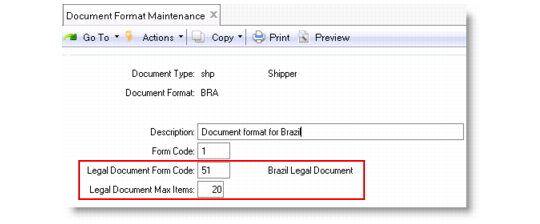
Use Document Format Maintenance (2.18.13) to define the format of legal documents to be printed along with shippers.
Document Format Maintenance (2.18.13)
Document Type
Choose shp.
Legal Document Form Code
Enter a two-digit numeric form code that uniquely identifies a country-specific legal document type. When you enter a valid form code, the legal document type description displays next to the form code.
The default code is specified in Legal Document Control (7.10.24).
Some countries have legal requirements to print legal documents with specific numbering rules, information, formats, and layouts when issuing, receiving, and/or moving goods. The form code identifies the appropriate printing procedure.
A valid form code is supported by a legal document generation program file installed in your system. If the file is not found, an error message displays.
Currently, the system supports the following form codes: 11, 21, 31, 41, 51, and 61. While these form codes primarily address the legal document formatting requirements of Poland, Chile, Argentina, Turkey, Brazil, and Russia respectively, they can also be used in other countries where applicable.
Legal Document Max Items
Specify the maximum number of item lines allowed in a single shipping transaction.
When 0, this field has no effect; when greater than 0, the system limits the number of lines on a shipper to this number. The default is 0.
This field also affects pre-shipper generation. When the system is supposed to generate legal documents along with the shipper:
• This setting overrides the Max Lines on a Pre-Shipper field in Container/Shipper Control (7.9.24).
• When you generate pre-shippers in Picklist/Pre-Shipper – Automatic (7.9.1), this field controls the number of lines on a pre-shipper and automatically splits a pre-shipper into two or more pre-shippers when the maximum line limit is reached.