Enabling Advanced Self-Billing
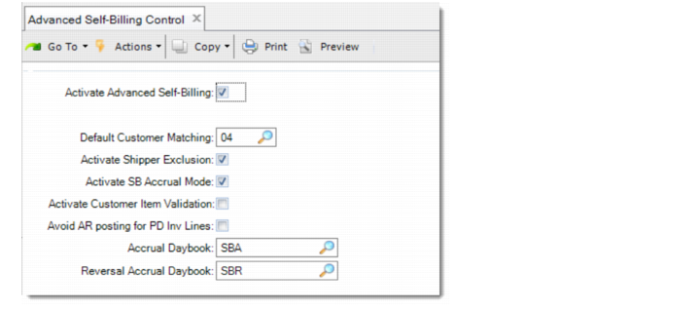
Use Advanced Self-Billing Control to enable the Advanced Self-Billing functionality and configure the generic settings.
Advanced Self-Billing Control
Activate Advanced Self-Billing
Select this field to enable the Advanced Self-Billing functionality.
Default Customer Matching
Specify the method to match shippers into self-billing invoices.
Available options are:
• 01: Matching is done by Shipment reference, RAN (Release Authorization Number), customer part, and matching address.
• 02: Matching is done by RAN, customer part, and matching address.
• 03: Matching is done by shipment reference, customer part, and matching address.
• 04: Matching is done by customer part. This option is called FIFO, which is a weak control option.
Activate Shipper Exclusion
Specify whether to activate the shipper exclusion functionality. When selected, you can set up exclusion criteria in Self-Bill Customer Data Maintenance and specify the shippers to exclude in Self-Bill Excluded Shipments Maint. For more details, see
Self-Billing Exclusion.
Activate SB Accrual Mode
Select this field to enable accruals and reversal accruals when shippers and self-billing invoices are processed. If enabled, you are prompted to specify the accrual account at order entry; the revenue accrual is created when the shipments are confirmed (or consumed in consignment inventories). The accrual is reversed automatically when the self-billing invoice is posted.
Activate Customer Item Validation
Specify whether to validate customer items during self-billing invoice creation. When activated, the items in the invoice must be valid items in item master data. Otherwise, the invoice cannot be created. Memo items cannot be invoiced using the self-billing process.
Avoid AR posting for PD Inv Lines
Specify whether to avoid the invoice lines with price differences from being posted. This field works with the Self-Billing Exclusion functionality as follows:
• When this field is selected and the shipper in the invoice line is excluded, you cannot post the invoice line with a price difference.
• When this field is selected and the shipper in the invoice line is not excluded, you can post the invoice line with a price difference.
• When this field is not selected, you can post the invoice line with a price difference, even though the associated shipper is excluded.
Accrual Daybook
Specify a daybook that the system uses to register all the transactions in Financials. The daybook must be created for self-billing and with Journal Entries type and Operational control. The transactions registered in this daybook are:
• SH-FM: Shipment forced matching
• SH-RM: Shipment reverse matching
• SHP-SS: Discrete sales order shipment.
• SHP-CF: Shipment confirmed (using scheduled orders)
• SBI-MT: Self-billing matched tolerance
• SHP-RB: Shipment Revaluation
Reversal Accrual Daybook
Specify a daybook to post the accrual reversals for self-billing. The daybook can be the same as the Accrual Daybook, or another.
The transactions registered in this daybook are:
• INV-FM: Invoice Forced Matching
• INV-RM: Invoice Reverse Matching
• INV-PT: Invoice Posting