Sales Order Shipments
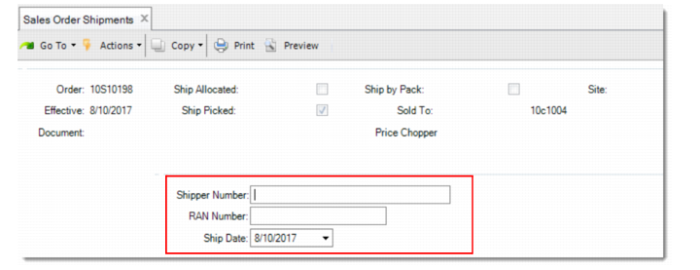
When using Sales Order Shipments to ship self-billing sales orders, you are prompted to enter shipper number, RAN number, and ship date. These values are used to match shipments with self-billing invoices.
Sales Order Shipments for Self-Billing Sales Orders
Shipper Number
Enter the shipper number. Depending on the matching method set in Advanced Self-Billing Control or Self-Bill Customer Data Maintenance, the shipper can be used for matching shipments with invoices in Self-Bill Matching Execute.
RAN Number
Enter the Release Authorization Number (RAN). Depending on the matching method set in Advanced Self-Billing Control or Self-Bill Customer Data Maintenance, the RAN number can be used for matching shipments with invoices in Self-Bill Matching Execute.
Ship Date
Record the date for the Self-Bill order shipment. It defaults to the current system date. You can change it to reflect the actual shipment date.
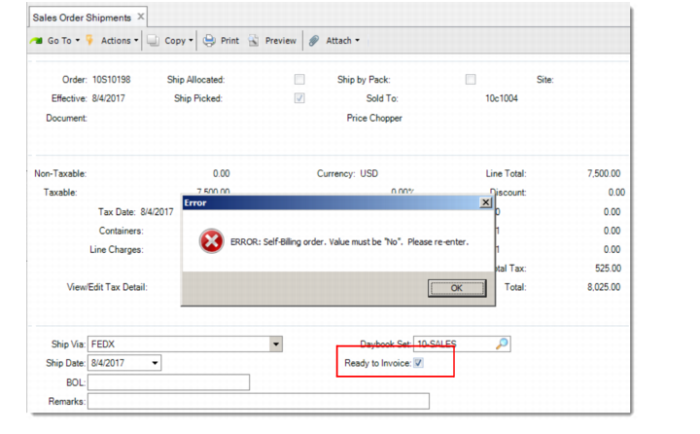
Important: For self-billing orders, do not select Ready for Invoice when you confirm the shipments in Sales Order Shipments.