Configure Stored Views Access
You can create and use stored views in the Channel Islands UI that customize screen layout, emphasizing important information needed for everyday use and specific tasks. Depending on the role, you may need to configure different levels of access for the types of stored views a user can create, edit, or delete.
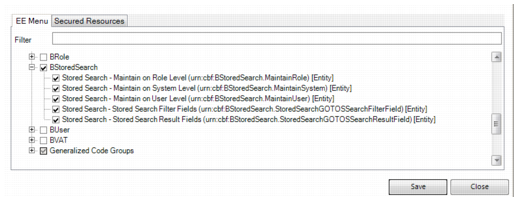
Stored-view security must be configured for each role and is completed in Role Permissions Maintain in the .NET UI. To enable this feature, double-click a role, then set permissions on the EE Menu tab. Under Secured items not on menu, expand BStoredSearch.
Note: The Stored Search check boxes do not secure or affect stored searches in the Channel Islands UI.
Stored Views
Depending on the access required for this feature, you can grant access to any of the following options, then click Save:
• Stored Search – Maintain on User Level. Allows users to create personal views that only they can view and manage. It is recommended that all users have the ability to customize their own views.
• Stored Search – Maintain on System Level. Allows users to create and manage System views that every user who has access to the Channel Islands UI can view.
• Stored Search – Maintain on Role Level. Allows users to create and manage role views that every user assigned to that role can view.
To ensure that all users can configure and save individual views, select Stored Search – Maintain on User Level for the webui_user role. It is recommended that you grant access to the Role Level and System Level options for the QAD Admin role, the SuperUser role, and any other admin roles in your system.