Create and Manage Packaging
To capture information on how goods are packaged and the quantity of each pack, QAD EE Serialization functions provide a way to create, maintain, and retrieve packaging master data records. Serialization functions automate the process of receiving inventory for either inbound receipts or manufactured goods and the capture of the multilevel packaging data for tracking purposes. These functions also automate the process of issuing materials either for shipments or to production.
Packaging master data tracks how many units go into a unit pack and how many packs can be assembled on to a next-level packaging type. To capture information on the number of units that go into a unit pack and the number of packs that can be assembled on a higher-level packaging, Serialization functions let you define:
• Pack codes
• Bill of packaging structure by:
• Item
• Source (ship-from, site)
• Destination (ship-to site)
Pack Codes
You can define pack codes for any type of packaging. You can create pack codes from the lowest-level pack up to the top-level pack, such as box, case, and pallet. You can indicate whether a pack can hold different items or lots.
BOP Structures
The BOP structure defines how many packing units are required for each level. You can define different packing types, such as pallet, shipper, or cartons. You can also assign the UM and define the number of units of lower-level pack types that the top-level packaging type contains.
Creating this BOP structure lets the system track how packs are aggregated (quantities per pack) and how serial IDs are assigned to each produced or received pack. This feature helps the process of aggregating and commissioning packs during receipt. Once you receive packs in stock packs, you can build, remove, open, decommission, and so on.
BOPs can be generic and you can reuse them for many items; or, they can be specific to an item or item BOM code. You can use different BOP codes for the same item when shipping to multiple partners that have slight variations in packaging requirements. You can assign packaging or BOP codes by item, partner, and more. You can assign them during receipt.
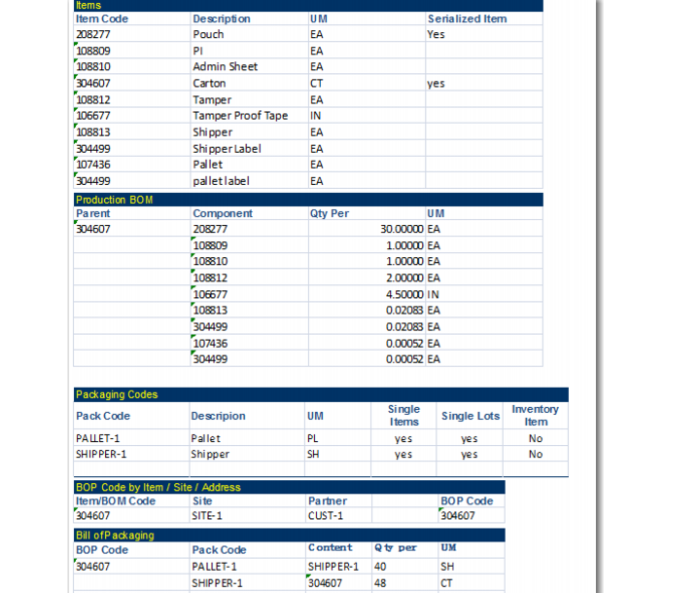
The following example shows item packaging levels.
Package Example