Setting Controls
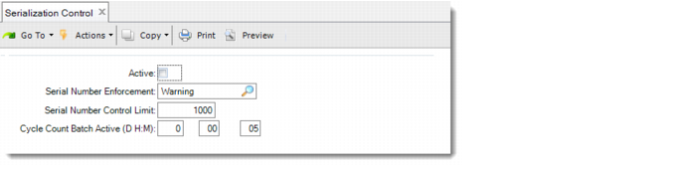
Use Serialization Control (3.17.24) to define control settings for Serialization.
Select the Active field to activate Serialization functions.
Note: QAD Serialization is not compatible with QAD Warehousing. When QAD Warehousing is activated, you cannot select the Active field in Serialization Control to activate Serialization functions. And if QAD Serialization is activated, you cannot use QAD Warehousing functions.
You can set control options that let you avoid system generation of many serial IDs at the same time. You do this by setting up the type of validation the system applies when the maximum number is reached.
When you create serial IDs with any of the Serialization pack create functions, when the number of created serial IDs exceeds the serial number control limit set, the system can display a warning or error.
Serialization Control (3.17.24)
Active.
Select this field to activate Serialization functions. The default value is No.
Serial Number Enforcement
Indicate the level of enforcement when serial number control limits are reached.
None: The system takes no action when the serial ID number limit is reached.
Warning: The system displays a warning when the serial ID number limit is reached but processing can continue.
Error: The system displays an error when the serial ID number limit is reached, and you cannot continue processing until you reset values in Serialization Control.
Serial Number Control Limit
Enter the maximum number of serial IDs to generate.
The system generates the maximum number of serial IDs in one transaction; for example, during a pack create, receipt, or build.
Cycle Count Batch Active (D H: M)
Enter the time in days, hours: minutes for active cycle count batch processing. Cycle count batch processing can remain active after the system creates the batch to process. When you enter a (0) as the time, this indicates there is no limit on active days. You cannot enter negative numbers,
When you enter cycle count results, the system first attempts to locate an active batch ID based on site/location/item. When a batch ID cannot be found, the system creates a new one. When the system finds an expired batch ID, the system sets the batch ID as expired and creates a new batch ID. When the batch ID is active, the system uses the batch to record cycle count results.