Setting Up QAD EE Programs
If you are only running serialized operations, then you use the following programs in QAD Enterprise Applications:
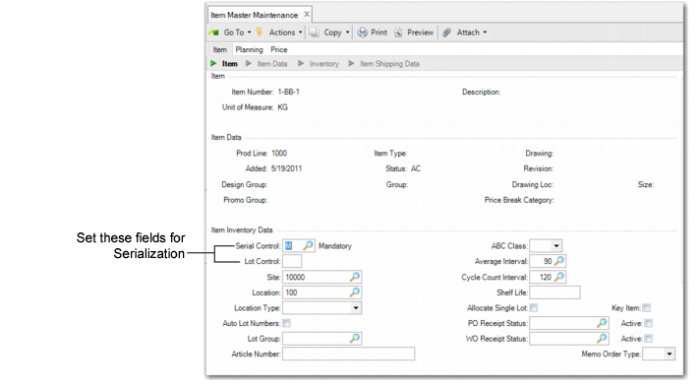
• Set serial control for items in Item Master Maintenance (1.4.1).
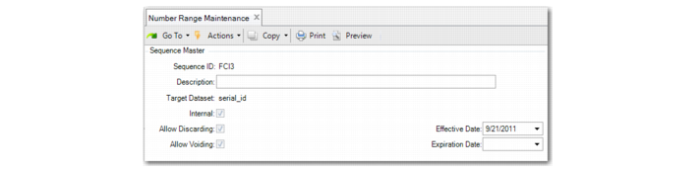
• Define a number range in Number Range Maintenance (36.2.21.1).
Note: Site Maintenance is not described in this user material; however, you should set up the site in which Serialization operations occur. When an item is serialized, you can define different sequence ranges for different sites in Serial ID Range Maintenance. See
QAD Master Data User Guide for information on setting up sites.
Setting Serial Control for Items
Use Item Master Maintenance to set the serial control for specific items.
Item Master Maintenance (1.4.1)
Important fields include:
Serial Control
Define whether this item needs to be serialized.
M: Mandatory. Each item in the inventory requires a serial ID.
N: Never. This item is not serial controlled, but the pack containing this item can have a serial ID. The default is N(ever).
Lot Control
The value of Lot Control for the item determines if a lot or serial number is required.
Blank: Lot/serial numbers are not required, although they can be recorded as needed.
When Serial Control is set to M(andatory) and Lot Control is blank, the system generates item serial IDs; however, it is not mandatory that you enter the lot number.
L: Lot numbers are required for this item. During issues and receipts, a lot number must be entered. The lot number applies to the entire transaction quantity entered.
When set to L and:
• Serial Control is set to M(andatory), the item requires both item serial ID and lot number, so that each inventory item has a serial ID and the items can be of the same lot.
• Serial Control is set to N(ever), the system does not create an item serial ID for the item; however, you can still pack it in a serialized pack. You must enter a lot number.
S: Single Lot. Lot is limited to having a maximum quantity of one. During issues and receipts, the maximum quantity for each lot is a quantity of one. For example, when you receive 10, you must enter 10 lot numbers with a quantity of one each.
When the Serial Control field is set to M(andatory), you cannot set this field to S. Conversely, when you set Lot Control to S, you cannot set Serial Control to M.
The value entered in Item Master Maintenance is used as the default for all sites.
The system maintains complete lot/serial number traceability. The Lot Actual Bill Inquiry lists all the lot/serial numbers of components and raw materials used to make a given lot/serial number.
Defining a Number Range
Use Number Range Maintenance (36.2.21.1) to define a number range for both internal and external serial IDs. If the serial IDs are imported, clear the Internal box. Set the Target Dataset field to serial_id.
Number Range Maintenance (36.2.21.1)
Important fields include:
Sequence ID
Indicate the sequence ID for the serial IDs.
Target Dataset
Set this field to serial_id.
Internal
Indicate whether the serial IDs are internal or imported.