Maintaining Serial ID Range
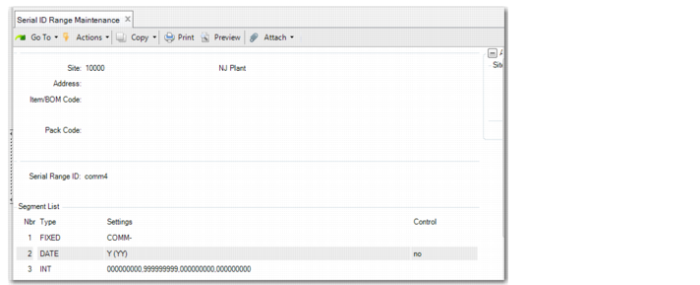
Use Serial ID Range Maintenance (13.14.19) to define different serial ranges and specify which serial ID range to use. You can set up a range of serial IDs by site, address, item number, or pack code.
You can leave the site, address, item, and pack code fields blank and then enter the serial ID range.
Note: Make sure that the dataset of the serial range ID that you enter is serial_id.
After you enter the serial ID range, the system displays the Segment List frame. In the Segment List frame, the system displays the last used sequence number.
For functions that generate serial IDs or validate serial IDs, the system performs in the following ways:
• When a new serial ID is needed, the system first checks the imported serial ID ranges and then regular ones in NRM. If an effective matching can be found, the system gets the unused serial ID and marks it as used.
• The system verifies whether a serial ID is generated from imported serial ranges. When an imported serial ID is added to the serial master, the system marks it as used.
Serial ID Range Maintenance (13.14.19)
Site
Enter the site where inventory is manufactured or stored.
Address
Enter a valid supplier for purchased materials, a valid site address for distribution orders, or a valid customer ship-to or sold-to for goods sold.
Item/BOM
Enter the item number associated with the serial ID range. It can also be a BOM code.
Pack Code
Enter the pack code associated with the pack sequence. When blank, the system can use the sequence for any pack code, regardless of whether it is for an item serial ID or a pack code. When both item/BOM and Pack Code are blank, you can use the serial ID range for any pack or any item.
Serial Range ID
Enter a valid sequence ID that the system uses when it creates this serial ID range. Make sure that you predefine the sequence ID in Number Range Maintenance with the serial_id. The system looks for a matching serial range ID in the following order:
a Pack code, item/BOM code, address, site
b Pack code, address, site
c Pack code, item/BOM code, site
d Pack code, site
e Pack code, item/BOM code, address
f Pack code, item/BOM code
g Pack code, address
h Pack code
i Item/BOM code, address, site
j Item/BOM code, site
k Item/BOM code, address
l Item/BOM code
m Address, site
n Address
o Site
p All fields are blank