Defining Pack Codes
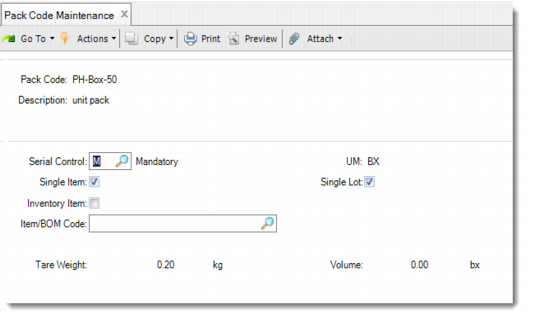
Pack Code Maintenance (13.14.1) lets you define pack codes for pallets, shippers, cartons, and so on. You can set up pack codes for any type of packaging. You use pack codes to define the type of packaging and help define the way items and inventory are stored to facilitate warehouse and logistics activities.
In the first frame, enter the pack code and, optionally, a description.
Note: In some reports, only the description appears for the pack code and not the pack code itself.
In the following frame, define pack characteristics by specifying serial control, UM, single item, single lot, inventory item, and item/BOM code.
When the pack is an inventory item, the system defaults the tare weight and UM and volume and UM. When a serial ID uses the pack code, you cannot change the UM.
Deleting a Pack Code
To delete a pack code, enter the pack code that you want to delete in Pack Code Maintenance. Press Enter or click the Next button, and you can see the Delete button displayed. Click the Delete button to delete the pack code.
Pack Code Maintenance (13.14.1)
Pack Code
Enter a pack code for a pallet, shipper, carton, pouch, or blister.
Description
Optionally, enter a description of the pack code.
Serial Control
Define whether this pack needs to be serialized.
M: Mandatory. The pack is required to have a serial ID. The default is mandatory.
N: Never. When this pack code is used, these are never serialized.
Note: You can override the N value in Packaging Structure Maintenance so that the pack code can be serialized when used by a particular BOP.
Single Item
Specify No when the pack can hold different items. The default is Yes.
UM
Enter the unit of measure of the pack.
Single Lot
Specify No when the pack can hold items from different lots. For any pack, if Single Item is set to No, the setting of Single Lot does not have an impact on packaging transactions. The default is Yes.
Inventory Item
Specify Yes if you want the pack to be associated with an inventory item. The default is No.
Item/BOM Code
Enter the item code of the pack. Specify a BOM code in case of multiple items to be consumed when the pack is used. When Inventory Item is Yes, system uses this field to consume the pack item. If it is blank when Inventory Item is Yes, it means the item is the same as the pack code.
Tare Weight/UM
Enter the tare weight and unit of measure of the packaging container. If this pack is an inventory item, this value defaults from the item ship weight.
Volume/UM
Enter the volume and unit of measure of the packaging container. If this pack is an inventory item, this value defaults from the item volume.