QAD 2017 Enterprise Edition
>
User Guides
>
Serialization
>
Setup
>
Setting Up Packaging
>
Defining BOP Codes and Packaging Structure
Defining BOP Codes and Packaging Structure
Use Packaging Structure Maintenance (13.14.4) to:
• Define bill of packaging (BOP) codes and packaging structures that include packaging levels.
• Delete a BOP code.
• Delete the pack/content relationship from the packaging structure.
A BOP code determines the way goods are packaged and stored after inbound and production receipts. BOP defines the way items are packaged as a single-level or a multiple-level packaging structure.
The lowest-level pack is the unit pack. The unit pack is the pack whose content is an inventory item. The highest-level pack is the master pack. When multiple packaging levels are in use, the master pack packaging type contains another pack (not an inventory item) that gets assembled in this pack. For example, an inventory item is stored in a box that is put into a case, which is then put on a pallet for storage and shipment. In this example, the box is the unit pack and the pallet is the master pack. A pack code is created for each level of packaging (box, case, and pallet) and the packaging structure is defined to describe the relationship between the pallet and the case, the case and the box, and the box and the item.
Navigation
To create a BOP code, use the following procedure:
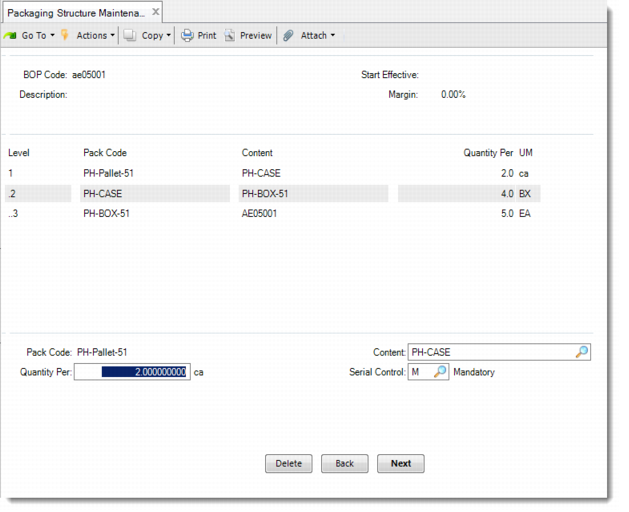
In the first frame, enter the BOP code, and optionally, enter a description. Enter the effective period for the BOP code, then define the margin percentage of additional serial IDs to allocate if you require additional quantities.
In the next frame, define packaging structure. All hierarchy levels are listed in this frame. Level is display only as the system determines the level of the pack/content relationship in the packaging hierarchy. The outmost pack is level 1.
Example: You have the following packaging structure:
1 Case = 50 pieces of Product A
1 Pallet = 70 cases of Product A
You define a BOP structure with two levels as:
Level: 1
Pack Code: Pallet
Content: Case
Qty Per: 70
UM: Case
Level: 2
Pack Code: Case
Content: A
Qty Per: 50
UM: EA
Deleting Codes and Structures
To delete a BOP code, after you enter it in the BOP Code field, click Next. Then you can see the Delete button displayed. Click the button and confirm the deletion.
To delete a pack/content relationship, go to the details of this level and move the cursor into the the Quantity Per field. Then you can see the Delete button displayed. Click this button and confirm to delete the pack/content relationship. When you remove the relationship, the system recalculates levels in the packaging structure.
You can use Packaging Structure Browse (13.14.5) to view packaging structure data.
Packaging Structure Maintenance (13.14.4)
BOP Code
Identify a packaging hierarchy from the inventory item to the highest-level pack.
Start Effective
Enter the first day the packaging structure is effective. A packaging structure is effective over a defined period of time. Use effective dates to phase in packaging structure changes. Blanks are allowed.
Description
Optionally, enter the description of the BOP code.
Margin
Enter the margin percentage of additional serial IDs to allocate if you require additional quantities to cover any eventual scrap of numbers or have a greater range of numbers to select from for randomized serial ID assignments. For example, enter 10 if you think that you may require an additional 10 percent of serial IDs.
Pack Code
Enter the unit pack code that contains inventory items or assembly packs that hold other packs. This pack could be a content pack of the upper-level assembly pack.
Content
Specify the content that the parent pack contains. This can be an inventory item, unit pack, or assembly pack. If the parent is a unit pack (lowest-level pack), a blank is allowed, meaning any item can be put into this packaging structure.
Quantity Per
Enter the quantity of the content that the parent pack holds. UM is the unit of measure of content and is display only.
Serial Control
Define whether the parent pack requires serialization.
M: Mandatory. The serial ID is mandatory for the pack.
N: Never. When this pack code is used, these are never serialized.
The value for this field defaults from Pack Code Maintenance.