Assigning BOP Codes
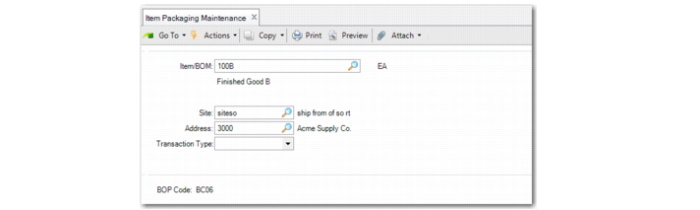
Use Item Packaging Maintenance (13.14.7) to link BOP codes with:
• Item
• Site
• Partner
• Transaction type
The combination of domain/item/site/partner/transaction type determines the BOP code to use.
In the BOP structure, you relate the hierarchy to a specific item; that is, you define the content of the lowest-level (unit) pack. With Item Packaging Maintenance, you specify which default BOP structure the system uses with receipts. Item Packaging Maintenance lets you specify the site code, the address code, or a transaction type when packaging rules differ by site, ordering, receiving, or shipping address, or depending on the transaction type.
For transaction types, a partner can be either a supplier (purchased materials), a customer (goods sold), or a site (distribution orders). Receipt transaction types are typically unplanned receipts, purchase receipts, or production order receipts.
You can leave site, partner, and transaction type blank to define a common BOP code for any site, any partner, and any transaction type. When Site, Address, and Transaction Type have values, the system looks for a matching BOP code in the following order:
1 Item, transaction type, address, site
2 Item, transaction type, address
3 Item, transaction type, site
4 Item, transaction type
5 Item, address, site
6 Item, site
7 Item, address
8 Item
9 Site, transaction type, address
10 Site, transaction type
11 Site, address
12 Site
13 Address, transaction type
14 Address
15 Transaction type
16 All fields not specified
When you require alternate BOP structures for a specific combination, you define the BOP structure in Packaging Structure Maintenance; then, manually select the right BOP structure during the receipt—the pack-build transaction. For example, when goods are shipped for sea transport, but to expedite a delivery, you ship the goods by air, an alternate packaging structure might be required.
Use Item Packaging Browse to view item packaging data.
Item/BOM
Enter the item or BOM code with which you want the system to associate a BOP code.
Site
Enter the site associated with the BOP code.
Address
Enter a valid address or site as the partner associated with the BOP code. The system applies the same restrictions that you define when you specify transaction type restrictions for items, depending on the item status.
Transaction Type
Enter the transaction type associated with this BOP code. This can include inventory transactions as well as other transactions defined. The system applies the same restrictions that you define when you specify transaction type restrictions for items, depending on the item status. You can specify more than inventory transactions; for example, when you apply Serialization to released work order goods.
BOP Code
Enter the BOP code for the item. The system looks for the BOP code in the following order:
a Item, transaction type, address, site
b Item, transaction type, address
c Item, transaction type, site
d Item, transaction type
e Item, address, site
f Item, site
g Item, address
h Item
i Site, transaction type, address
j Site, transaction type
k Site, address
l Site
m Address, transaction type
n Address
o Transaction type
p All fields not specified