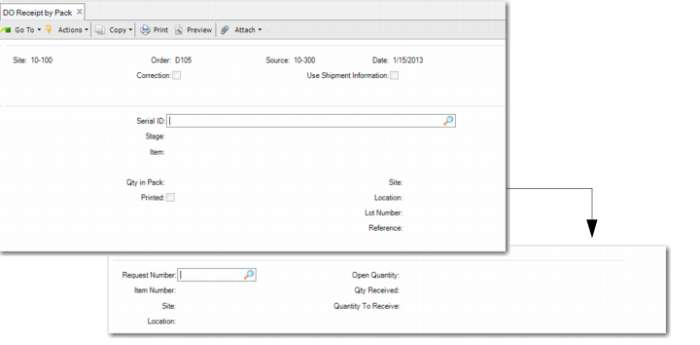
DO Receipt
Use Distributed Order Receipt by Pack (12.9.13) to record the receipt of inventory from DOs and transfer goods by serial IDs from in-transit sites or locations to the other sites or locations.
QAD EE Distributed Order Receipt Versus Distributed Order Receipt by Pack
When you use Distributed Order Receipt (12.15.20), note the following:
• The system displays an error message, informing you to use Distributed Order Receipt by Pack when:
• All items of the selected DO are set for mandatory serial control.
• Mandatory serial control is set and you edit the order line for an item with serial control.
• When items on the order are not serialized, and you use the QAD EE DO receipt program to receive or check loose items in the in-transit location, then you enter a quantity that is greater than the quantity of the loose inventory in the in-transit location.
• When Use Shipment Information is Yes and there is an item with mandatory serial control, the system only warns you to use Distributed Order Receipt by Pack to receive the item. The system sets the quantity to receive to zero on the order line; however, you can still receive other non-serialized items of this distributed order using the QAD EE DO receipt program.
• When you use multiple databases and an item is set for mandatory serial control in the supply site and non-serialized in the demand site, you can receive items using QAD EE Distributed Order Receipt. When you do, the system:
• Consumes the serial IDs of the item in the in-transit database
• Does not create serial IDs in demand database
• Receives loose non-serialized items
Also, when you store the serialized pack/item in an in-transit location that is linked with a DO, note the following:
• The serial ID cannot be an input serial ID for use in the following Serialization programs.
• Pack Build
• Pack Remove
• Pack Transfer
• Pack Receipt
• Pack Issue Unplanned
• You cannot return the serial ID using Purchase Order Returns by Pack.
• You cannot pick the serial ID using Pre-Shipper/Shipper Picking, Pre-Shipper/Shipper Pack Build, or Pre-Shipper/Shipper Workbench.
Navigation
This program has several frames:
1 In the Order Selection frame, enter the demand site, distributed order ID, and supply site for the distributed order. You can optionally specify to use shipper information. When you do, the system displays a Shipper ID field to enter the shipper number.
2 In the Serial ID frame, you enter the serial ID of items to receive. When Use Shipment Information is Yes, the system defaults serial IDs from the shipper and DO. You can click Back to receive by the default serial IDs. You can leave the serial ID blank. Refer to the field help for Serial ID for more information.
3 In the Distributed Order Line frame, you specify the request ID for the serial ID to receive.
Distributed Order Receipt by Pack (12.9.13)
Site
Enter the site at which you receive the items on this distributed order.
Order
Enter the distributed order number to be received.
Source
Enter the site from which the items on this distributed order were shipped.
Date
Enter the effective date of the receipt. The default is the system date.
Correction
Indicate whether the items on this distributed order are returned for correction or received:
Yes: This distributed order is a return transaction. When Yes, items will be returned to the in-transit site/location from where they are stored.
No: This distributed order is a receipt transaction. When No, you can receive items to the demand site/location from the in-transit site/location. The default is No.
Use Shipment Information
Indicate whether to use the serial IDs shipped for the order.
Yes: You do not need to manually enter serial IDs in this function to receive; the system defaults the serial IDs previously shipped for this order and shipper (if specified). The Shipper ID field displays when set to Yes to specify the shipper to receive.
No: The system does not default serial IDs, and you are required to manually scan or enter the serial IDs to receive.
In the following situations, only when you set Use Shipment Information to Yes, you can receive the items or packs:
• There are non-serialized loose items that are linked with the DO shipper and the items are not mandatorily serial controlled in the demand site.
• There are unit packs that hold items of multiple combination of item, lot, and reference.
• There are assembly packs that contain items directly packed into them without being first packed into unit packs.
Shipper ID
Enter the shipper ID for this receipt. This field displays only when Use Shipment Information is set to Yes. You can specify a shipper to receive or leave it blank to receive items for the order when the order ships by multiple shippers. The system adds serial IDs of all shippers with this DO to the receiving list.
Serial ID
Enter the serial ID to receive.
When Use Shipment Information is Yes, the system defaults serial IDs from the shipper and DO. You can use the arrow keys to browse through serial IDs. Click Back to receive by the default serial IDs. Also, you can remove the loaded serial IDs from the receiving list. When you enter an Aggregated item serial ID that is in the receiving list, the system validates whether its parent pack is picked for multiple DO requests. When Yes, the system prompts you to remove its parent pack from the receiving list. And if the stage of this parent pack is Aggregated, the system also removes the parent pack from its master pack. Then the system prompts you to remove the item serial ID from its parent. If you respond with Yes, the system decreases the quantity in pack of its parent pack. When the parent pack is empty after removal, the system decommissions the parent pack.
Leave blank only to receive from a different domain when the items are set for mandatory serial control in the demand location and neither the serialized packs or items are in the in-transit location.
Item
Enter the item number to receive. You can enter items only when you leave the serial ID field blank.
Req
Enter the intersite request for the receipt of this distributed order.
Item Number
The system displays the item number of the request.
Site
Specify the demand site. The system receives the serial IDs you enter in this site. The default is the header site.
Location
Enter the location for items to receive.
Quantity Open
The system displays the open quantity of the select request, calculated as the Qty Ordered minus the Total Qty Received.
Qty Received
The system displays the cumulative quantity of all the scanned serial IDs for the selected request in this transaction.
Qty to Receive
Enter the number of items in the scanned pack to receive for the selected request. This field is read-only for scanned serial IDs for an assembly pack or item.