Program | Processing Information |
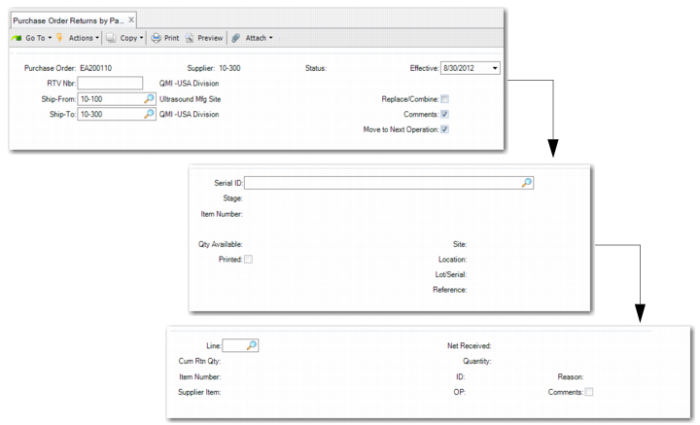
Pending PO Shipper Unload (5.13.12.13) | You return serialized packs to the supplier with negative quantity. You can enter a unit pack, assembly pack, or item serial IDs to return for the shipper or packing slip. When the pack to return is an active unit pack, you can assign it to different PO lines. The Inventory Data frame is read-only and shows the current inventory of the unit pack. When it is an active assembly pack that holds different items, you scan the individual lower-level packs inside and assign them to the PO lines. Lower-level packs can only hold a single item. When already an active assembly pack that holds a single item, you can leave the child serial ID blank to return the whole pack. You can only assign a single PO line. You can specify child serial ID separately to assign PO line on each of them or assign multiple PO lines when the child serial ID is a unit pack. The system cannot build additional higher-level packs for the return serial IDs. When you leave the Serial ID field in the Parent Pack frame blank and enter an active serial ID as the child pack, the system does not generate a parent serial ID. For return packs, all information in the Inventory Data frame is display only. So, you are required to adjust the inventory or pack structure before the return. In the Purchase Order Line frame, you enter a negative quantity to pack for returns. Make sure that the item on the specified PO line is the same as the item in the pack to be returned. You can view all packs and items serial IDs for a return-to-vendor shipper. Pending PO Shipper Unload Report displays the entire hierarchy from master pack to the item serial ID and picking information. Kit components serial IDs are recorded and displayed; however, component serial IDs are not recorded and do not display. When a subcontract PO line is assigned, it can only be for the last operation for the production. The system updates the quantity complete at the WO operation after return. The system does not perform an ASN match for return packs. You can confirm the return in PO Shipper Receipt. The system changes serial IDs to the Picked stage in PO Shipper Unload, links to the shipper/packing slip, then confirms. Once confirmed, the serial IDs are consumed. |
Use Pending PO Shipper Unload to receive serial IDs that were previously returned to the supplier. When you scan a serial ID that is in the Consumed stage and not linked with any order or shipper, the system considers the serial ID as previously returned to the supplier, and the supplier shipped the pack back to you with the same or different goods. The system accepts the serial ID in both the Parent Pack and Child Pack frames. The system assigns the pack code, item number, site, location, and other values during the transaction. Note: When serial IDs are picked in Pending PO Unload but not yet confirmed, you cannot handle the items using Pack Build, Pack Remove, or Pack Issue Unplanned. You can, however, use Pack Transfer to move picked packs linked with purchase orders. | |
PO Shipper Receipt (5.13.20) | Use PO Shipper Receipt to confirm the shipper/packing slip with a negative quantity. The system validates whether the return quantity is less than or equal to the net received quantity on each PO line. You cannot perform an over-return. |
Purchase Order Returns (5.13.7) | You can only return loose items without serial IDs using this program. When you enter serialized items or the inventory of loose items is not enough but the same items exist in the pack, the system displays an error message. You are required to use the new Purchase Order Return by Pack function. |