Production
License plate inventory management and item serialization play a role when you process work orders for production. Serialization production-related functions let you book serial ID ranges, based on SO information. They also let you receive work orders (capturing serialization data during the receipt), create packs, transfer goods using Serialization, and more.
The major process steps including Serialization functions to fulfill production work orders include:
• Book serial number range or create serial IDs after you create the WO in Work Order Maintenance (16.1) or before or after WO release.
• Create serial IDs and print labels after you create the WO in Work Order Maintenance or before or after WO release.
• Transfer components to the shop floor.
• Backflush serialized goods, receiving finished goods and issuing WO components by pack.
• Reverse WO receipts by pack, identifying the WO and packs to return.
• Issue by packs or receive components back to stock that were previously issued.
• Receive WO semi-finished goods (quantity received or scrapped).
• Transfer finished goods to warehouse or return leftover materials to raw material warehouse.
The major process steps to fulfill production orders in advanced repetitive processing include:
• Create serial IDs and print labels by production line.
• Transfer components to the shop floor.
• Scrap/reject goods.
• Backflush transactions.
• Transfer finished goods to warehouse or return leftover materials to raw material warehouse.
Note: For WO release and print functionality, the system performs packing based on lot-controlled inventory, not by serial number.
Production Process
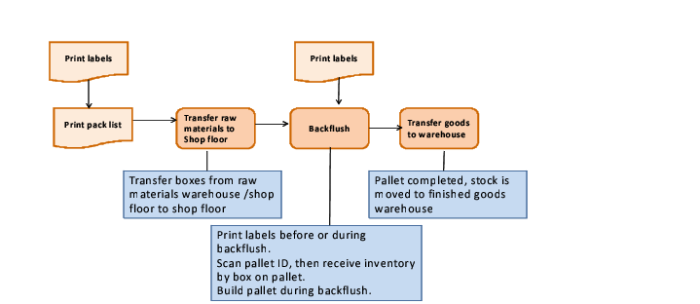
For transfers, typically the following occur:
• Cases of raw material are moved to the shop floor.
• Production BOM contains packaging material that is issued when it is used, using pack create and build functions.
• Backflush receipts are done by the case.
• Optionally, a case is built on a pallet.
• Once production is completed, leftover raw material transfers back to raw materials warehouse.
The production process flow requires stock movements from and to the shop floor locations. These transactions are inventory transactions. Shop floor transactions, however, are not a part of Serialization—only inventory issues and receipts related to production.
Programs to Use
The programs to use in production processing are described in the following topics. In the steps, QAD ERP programs that are in use during production processing are noted; otherwise, the program is a Serialization program.
For a work order, you use these programs when processing:
1 Book serial IDs for a discrete WO, using Work Order Serial Booking.
2 Issue WO components, using QAD ERP programs, such as Work Order Component Issue.
3 Move components to shop floor, using Pack Transfer.
4 Print labels by WO, using Pack Create by WO.
5 Pack receipt by WO, using Pack Receipt by WO.
6 Move finished goods to warehouse, using Pack Transfer.
7 Return components to warehouse, using Pack Build and Pack Transfer.
For a production line, you use these programs when processing:
1 Release production, print the picklist, using QAD ERP programs.
2 Move components to the shop floor, using Rep Picklist Transfer by Pack.
3 Print labels by production line, using Pack Create by Production Line.
4 Receive packs by production line and backflush components by pack, using Pack Receipt by Production Line.
5 Optionally, receive negative quantity to remove inventory packs you previously received, using Rep Receipt Correction by Pack.
6 Receive components back to stock that were previously issued, using Backflush Transaction.
7 Move finished goods to the warehouse, using Pack Transfer.
8 Return leftover components to the warehouse, using Pack Build and Pack Transfer.
Example Production Flows
The following provides typical flows within production, using packaging transactions.
Flow 1:
1 Create a repetitive schedule.
2 Create packs, using Pack Create by Production Line.
3 Transfer components to the work center location by pack and do the pack decommission, using Rep Picklist Transfer by Pack.
4 Perform a repetitive backflush, using Pack Receipt by Production Line.
5 Use Pack Build for leftovers of decommissioned components.
Flow 2:
1 Create an SO.
2 Book serial IDs for the SO, using SO/RMA Serial Booking.
3 Produce finished goods, using Backflush Transaction.
4 Build finished goods into packs for the booked serial IDs, using Pack Build.
5 Create a pre-shipper in QAD EE Pre-Shipper/Shipper Workbench.
6 Perform SO picking, using Pre-Shipper/Shipper Picking to move goods to staging area.
7 Perform SO packing, using Pre-Shipper/Shipper Pack Build.
8 Confirm/unconfirm the pre-shipper/shipper, using QAD EE programs.
Flow 3:
1 Create an SO.
2 Book serial IDs for the SO, using SO/RMA Serial Booking.
3 Create a WO to fulfill the SO created in step 1.
4 Link the WO to the order and convert booked serial IDs for the SO to WO, using Work Order Serial Booking.
5 Release the WO.
6 Perform WO receipt to receive goods for booked serial IDs, using Pack Receipt by WO.
7 Create a pre-shipper/shipper in Pre-Shipper/Shipper Workbench.
8 Perform order picking, using Pre-Shipper/Shipper Picking to pick goods received in step 6 and move goods to staging area.
9 Perform order packing, using Pre-Shipper/Shipper Pack Build.
10 Confirm the pre-shipper/shipper.