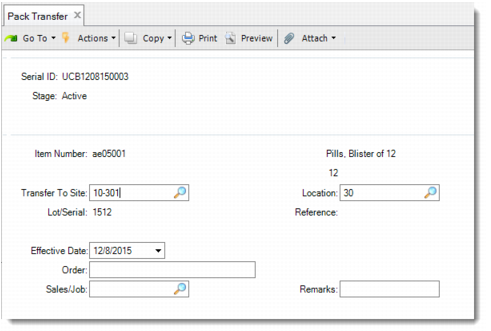
Pack Transfer
Use Pack Transfer (3.17.7) to transfer inventory by scanning serial IDs for either the unit pack or assembly pack.
Pack Transfer (3.17.7)
Serial ID
Enter the serial ID for this pack transfer. If you enter the serial ID of an aggregated pack whose direct parent is a master pack, the system displays a warning and prompts you to remove it.
Transfer To Site
Enter the target site.
Location
Enter the target location.
Effective Date
Enter the general ledger (GL) effective date for this transaction. The default is the system date.
Order
Enter a valid sales, work, or purchase order number for the transaction. You can also enter an RMA/RTS number or any other user-defined value.
Sales/Job
Enter the sales order number in reference to the inventory transaction.
When the inventory status of the serial ID is different from the inventory status of the destination location specified in Transfer To Site/Location, the system displays the message: Status conflict. Use to Status.
• If you Click Yes, the system uses the inventory status code of the Transfer To location.
• If you click No, the system checks whether there is inventory in the Transfer To location.
• If Quantity on Hand is not zero, the system prompts you to re-enter the Transfer To site/location.
• If Quantity on Hand is zero which results from negative loose inventory plus the quantity in pack of serialized packs or items, the system prompts you to re-enter the Transfer To site/location.
• If Quantity on Hand is zero, and there is no physical inventory in the destination, the system displays the message: Status Conflict. Use from status. You can select Yes to use source inventory status and do the transfer.