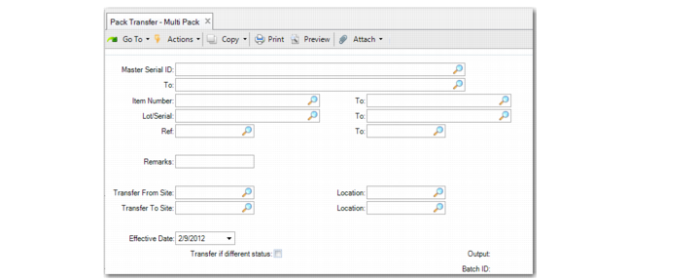
Pack Transfer - Multi Pack
Use Pack Transfer - Multi Pack (3.17.9) to select a range of inventory detail records to transfer. The system transfers the packs with master serial IDs in the selected range.
Pack Transfer - Multi Pack (3.17.9)
Master Serial ID/To
Enter a range of serial IDs of the packs to transfer or leave blank to consider all serial IDs.
Item Number/To
Enter a range of packs to transfer or leave blank to consider all items.
Lot/Serial/To
Enter a range of lot/serials of the packs to transfer. You can transfer packs by specific lot/serial or lot/serial range.
Ref/To
Enter a range of reference numbers of the packs to transfer or leave blank to consider all.
Remarks
Identify the source or the reason for the transaction.
Transfer From Site
Enter the site from which the system transfers inventory. The system takes the quantity of the specified serial, item, lot/serial, and lot reference number and issues it from the site and location you enter in this field and receives it into the Transfer To site and location.
Location
Enter the location for the site from which the system transfers inventory.
Transfer To Site
Enter the site to which inventory is being transferred.
Location
Enter the location to which inventory is being transferred.
Effective Date
Enter the general ledger (GL) effective date for this transaction. The default is the system date.
Transfer if different status
Specify Yes when the system can transfer to a site and location that has a different inventory status than the current one. When Yes, the system transfers, regardless of the inventory status. When No, the system transfers only between two inventories with the same status.