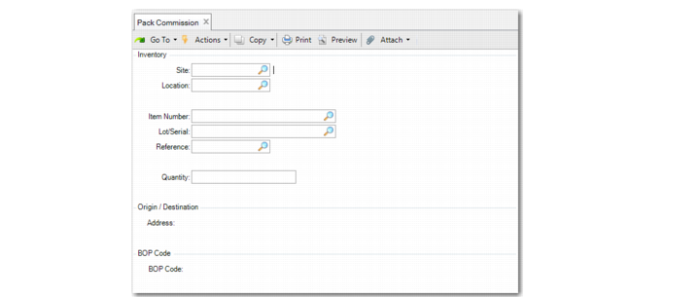
Pack Commission
Use Pack Commission (3.17.4) as another method to build packs. You start by identifying inventory; then, you determine the packaging structure, based on the predefined BOP structure definition.
You can define a pack commission as well as a pack build. When you do, the system automatically creates serial IDs based on the selected BOP and packaging content configurations that you manually change.
You can also adjust the actual BOP structure, based on the inventory quantity you select.
Pack Commission starts with inventory to pack and then creates packs, based on the pack configuration. Pack Build, another Serialization pack program, also lets you build new packs or load inventory into existing packs, but it does not start with inventory; however, it does need available inventory. Pack Create, another Serialization pack program, does not require that inventory be available.
Navigation
Enter inventory information in the Inventory frame. The system builds packs, based on the information you enter. Make sure that inventory is available and there is enough inventory that is not yet serialized.
In the Origin/Destination frame, enter information to determine BOP code and Sequence ID.
In the BOP Code frame, enter the BOP code.
Procedure
1 Enter the full master pack and incomplete master pack.
When the quantity in the master pack exceeds the capacity, the system displays a warning, informing you that incomplete master packs will be overloaded.
The system displays the pack configuration frame based on the number of incomplete master packs and configures incomplete master packs. The system generates serial IDs and prompts you to display them.
2 When all information is correct, respond Yes to the prompt to create serial IDs with stage set to Active.
For child packs, the stage is aggregated. The system displays the printer selection frame when the Label Printing module is installed.
When the quantity in the full master pack plus the quantity in the incomplete master pack is less than or greater than the quantity you enter in the Inventory frame, the system prompts you to replace the quantity to commission with the quantity in the full master pack plus the incomplete master pack quantity.
When you respond with Yes, the system updates the quantity to commission.
Pack Commission (3.17.4)
Site/Location
Enter the site and the location in which the item is stored.
Item
Enter the item to be packed. You cannot leave this field blank.
Lot/Serial
Enter the lot/serial associated with the item.
Reference
Enter the reference associated with the item.
Quantity
Enter the quantity of the item to be packed. The value you enter determines the quantity of the generated serial ID. You cannot leave this field blank.
Address
Enter a valid partner address. The address determines the BOP code. You cannot leave this field blank.
BOP Code
Enter the valid BOP code for the pack.