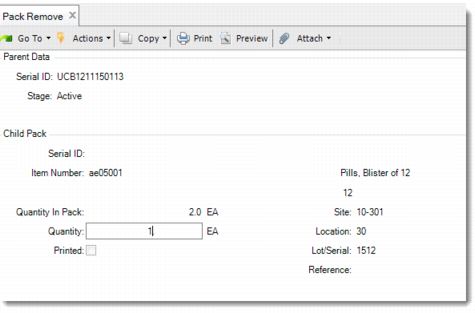
Pack Remove
Use Pack Remove (3.17.5) to remove inventory from a unit pack, or remove lower-level packs or items from an assembly pack. You can remove all or part of the inventory from the unit pack or assembly pack. Only one level of pack remove is supported. When the parent pack is empty after removal, the system decommissions the parent pack.
Navigation
This program has several frames.
Enter the serial ID in the Parent Data frame. When you do, the system displays the Child Pack frame.
In the Child Pack frame, enter the serial ID of the lower-level pack or item that you want to remove from the parent pack. Or, enter the information of non-serialized inventory at the lower level to remove it from the parent pack.
You can also remove a serialized item directly from the serial hierarchy by entering the item serial ID in the Parent Data frame. Then answer Yes to the prompt.
All fields in the Additional Parent Pack Data frame are display only and show you the pack code, number of child packs, and the total inventory in packs.
Pack Remove (3.17.5)
Serial ID
Enter the serial ID of the master pack from which you want to remove lower-level packs or items. Or, enter an item serial ID to directly remove it from its serial hierarchy. You cannot leave this field blank.
Serial ID
Enter the serial ID of a lower-level pack or item to remove it from the parent pack. This field is disabled when the parent pack does not contain packs or serialized items at the lower level.
Item Number
When enabled, specify the non-serialized item that you want to remove from its parent.
Lot/Serial
When enabled, specify the lot/serial number of the items that you want to remove from its parent.
Reference
When enabled, specify the reference of the items that you want to remove from its parent.
Quantity
When enabled, enter the quantity of the items to remove from its parent. You cannot enter a negative number, and the value cannot exceed the quantity currently in the pack.
Pack Code
This field is display only and shows the pack code of the parent serial.
Number of Child Packs
This field is display only and shows the number of child packs. For a unit pack, the values in the two fields are always 1.
Total Inventory in Packs
This field is display only and shows the total inventory in packs.