Pack Decommission
Use Pack Decommission (3.17.6) to do any of the following:
• Remove all lower-level packs and items from an assembly pack and decommission the assembly pack. After decommissioning, the assembly pack becomes Decommed, and all child packs and serialized items at the lower level become Active. Non-serialized items at the lower level become loose inventory. Package structures of the child packs remain the same.
• Remove all inventory units from a unit pack and decommission the unit pack. After the decommissioning, the unit pack becomes Decommed. Serialized items in the unit pack become Active. Non-serialized items become loose inventory.
• Decommission the whole package structure of an assembly pack. After the decommissioning, all packs at any level become Decommed. Serialized items become Active. Non-serialized items become loose inventory.
Navigation
There are several frames in this program.
In the Parent Data frame, enter the serial ID of the pack to decommission.
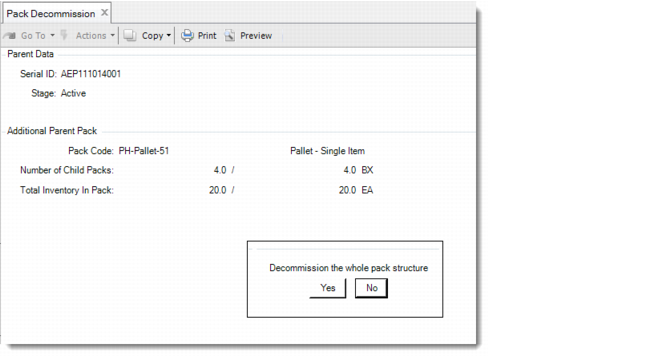
In the Additional Parent Pack frame, all fields are display only. The system displays additional information about the parent pack, including:
• Parent pack data
• Number of child packs - the number of current child packs and standard pack quantity of the parent pack
• Total Inventory in Packs - the total number of inventory items currently in the parent pack and the standard quantity of inventory items that can be held in the parent pack
The system prompts you to display the content of the pack. When you specify Yes, the system displays the Lower-Level Pack frame, which includes the serial/item number, pack code, and quantity in pack and its UM. All lower-level packs and items are listed.
If you enter an assembly pack, the system prompts you to decommission the whole pack structure. When you select Yes, the system decommissions the assembly pack and all packs at any level within it.
Pack Decommission (3.17.6)
Note: Other fields are described under other packaging transaction programs.
Serial ID
Enter the active serial ID of the pack to decommission. When it is an assembly pack, the system removes all lower-level packs and items from it. When it is a unit pack, the system unpackages all inventory in it.