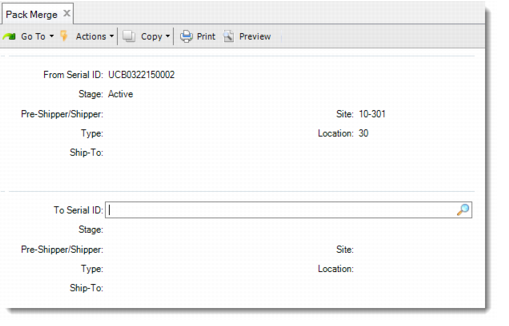
Pack Merge
Use Pack Merge (3.17.15) to combine the content of two serial IDs. By specifying the From serial ID and the To serial ID, you move the content of the From serial ID to the pack of the To serial ID. After merging, the stage of the From pack becomes Decommed. All content of the From pack becomes the content of the To pack. If the From serial ID is an item serial ID, after merging, it becomes Aggregated on the To serial ID. Picking and pegging information of the From serial ID is copied and merged with that information of the To pack.
You can use Pack Merge to do either of the following:
• Merge the content of one active serial ID into another active pack, including:
• Merging the content of an active unit pack into another active unit pack that holds the items of the same combination of item, lot, reference.
• Merging the content of an active assembly pack into another active assembly pack, when the units of measure of their child packs are the same.
• Merging an active item into an active unit pack that holds the same item with the same combination of item, lot, and reference.
• Merge the content of one picked serial ID into another picked pack, including:
• Merging the content of a picked unit pack into another picked unit pack.
• Merging the content of a picked unit pack into a picked assembly pack.
• Merging the content of a picked assembly pack into a picked unit pack.
• Merging the content of a picked assembly pack into another picked assembly pack.
• Merging a picked item into a picked unit pack.
Note: When a direct-content item of the From serial ID has the same item, lot, and reference information as a direct-content item of the To pack, make sure that they are picked for the same DO.
The From and To serial IDs can be linked with different pre-shippers or shippers. Make sure that neither pack contains kit component items and that the two pre-shippers or shippers have the same ship-from and ship-to. The system moves the From serial ID to the pre-shipper or shipper linked with the To serial ID, and continues with merging when you confirm with Yes.
When the item, lot, and reference combination in the From serial ID is different from that in the To serial ID, the system validates the Single Item and Single Lot options of the pack code of the To serial ID.
When the From and To serial IDs are in different site/location, you see a warning message displayed. This message informs you that the system will transfer the From serial ID to the site/location of the To serial ID.
Pack Merge (3.17.15)
From Serial ID
Enter the serial ID of a pack or an item whose content you want to merge into another pack. The stage of this serial ID can be Active or Picked. If it is active, make sure that it is not linked with any DO request.
To Serial ID
Enter the serial ID of a pack that receives the content of the From serial ID. When the From serial ID is Active, enter an Active To serial ID, and make sure that this To serial ID is not linked with any DO request. When the From serial ID is Picked, enter a Picked To serial ID. If the From serial ID or any of its content is booked for an SO line, make sure that the entered To serial ID is booked for the same master SO line. If the From serial ID or any of its content is not booked for an SO line, make sure that the To serial ID is not booked for any SO line, either.