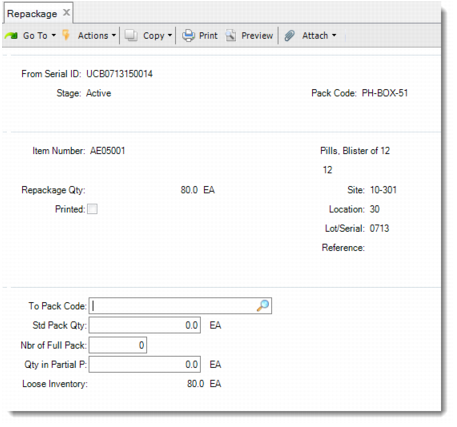
Repackage
Use Repackage (3.17.17) to repackage inventory that is stored in an Active unit pack. This function only allows you to repackage unit packs that hold non-serialized items.
By repackaging, you move all or partial inventory out of the unit pack, and then build all or part of the repackaged quantity into newly generated packs. If you build part of the repackaged quantity into packs, the remaining part of the repackaged quantity becomes loose inventory. The system generates new packs based on the pack code and standard pack quantity that you specify. If the unit pack is booked for an SO line, the system picks the serial IDs from the pool of Booked serial IDs. The system applies the entered Pack Code and Pack Quantity to those serial IDs.
After repackaging, the newly generated pack serial IDs become Active and stay in the same site/location as the original pack. The system decommissions the original unit pack when it becomes empty after repackaging.
Repackage (3.17.17)
From Serial ID
Enter the serial ID of a unit pack for which you want to do repackaging. This unit pack can only be Active and holds non-serialized items.
Repackage Qty
Specify the inventory quantity that you want to remove from the unit pack and repackage. The default value is the current quantity in the pack.
To Pack Code
Enter a pack code for the system to generate new packages for the repackaged quantity of inventory.
Std Pack Qty
Specify the number of items in a standard generated pack.
Nbr of Full Pack
Enter the number of full packs to generate.
Qty in Partial Pack
Enter the number of items to store in the partial pack.
Loose Inventory
This field is display only. The system calculates its value based on the following:
Loose inventory = Repackaged quantity – (Standard pack quantity * Number of full packs + Quantity in partial pack)