Scrap Inventory
Use Inventory Scrap by Pack (3.17.12) to scrap inventory by pack. You can identify the packs to be scrapped, and scrap full packs or part of a pack. You can also scrap non-serialized loose items with this function.
Navigation
This program contains several frames.
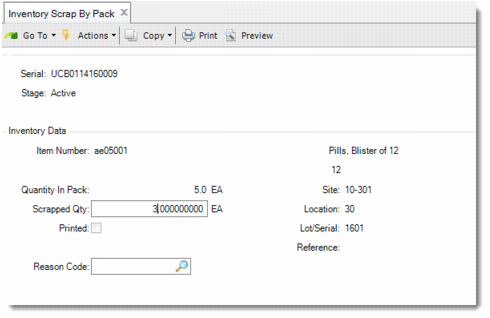
In the first frame, specify the serial ID to be scrapped. The pack or item serial that you enter must be active or aggregated on an active master pack. You can remove a pack at any level. If the serial ID is aggregated, the system prompts you to remove it from its parent. For information on valid serial ID entries, refer to the field descriptions following the Inventory Scrap by Pack graphic.
Specify the scrap quantity and a reason for the scrap in the Inventory Data frame. The Item Number, Site, Location, Lot/Serial, and Reference fields are enabled only when you leave Serial ID blank.
Specify additional data for the transaction in the last frame.
Note: For Debit Account and Credit Account, only authorized users can update the two fields. Authorized users are defined in Generalized Codes.
The system prompts you to confirm that the information is correct, and when Yes, the system scraps the items.
For all packs, when the system scraps all content, it changes the stage to Decommed. For all serialized items, the system changes the stage to Consumed, but maintains the item, lot/serial, and reference.
Inventory Scrap by Pack (3.17.12)
Serial ID
Enter a serial ID for one of the following:
Assembly Pack: When you enter an assembly pack serial ID, the system scraps the whole pack. When it is aggregated on an active master pack, the system removes the pack automatically. When multiple items are included in the pack, the system scraps all items.
Unit Pack: When the unit pack only contains non-serialized items of a single item number, lot, and reference, you are required to enter a scrap quantity in the Inventory Data frame. You can scrap part of the unit pack or the whole pack. In other scenarios, the system scraps the whole unit pack.
Item Serial ID: When you enter an item serial ID, the system scraps the specified item. When it is aggregated on an active master pack, the system removes the item automatically.
Blank: When this field is blank, you can enter non-serialized loose items to scrap. The system displays the Inventory Data frame to enter item number, scrap quantity, site, location, lot/serial, and reference.
Scrap Quantity
Enter the quantity to scrap. This field is editable for unit packs that only contain non-serialized items of a single combination of item, lot, and reference. The default is the pack quantity.
Reason Code
Enter the reason code used for the scrap transaction. When multiple items or multiple lots are scrapped with this transaction, the system applies the reason code to all items and all lots.
Total Cost
Enter the total cost of scrapped items. When multiple items are scrapped in one transaction, the system displays a summary for all items.
Note: For details on Order, Line, Auth Doc, Employee, Effective Date, Debit Account, and Credit Account, see the standard information regarding Inventory Scrap Transaction in User Guide: Master Data.