SO/RMA Serial Booking
Use SO/RMA Serial Booking (7.1.20) to capture serial numbers for use on specific sales orders.
When multiple sales order lines share the Sold-To, Item, and Purchase Order, you can book serial IDs for only one of those sales order lines. This sales order line for which you book serial IDs is called a master sales order line. The system links booked serial IDs only to the master sales order line. Other sales order lines within the group are going to use the serial IDs booked for the master sales order line. You can decide how many serial IDs to book for the master sales order line. When the booked serial IDs are used up, you can book more serial IDs for the master sales order line.
You can then create work order serial range bookings, for example, that come from sales order information. Use Serial Booking by Work Order Report to view serial ID bookings for work orders.
When making serial ID bookings, the system assigns—books a range of numbers to an order— based on the packaging hierarchy you define in the system.
You can set fields in Packaging Structure Maintenance so that the system adds additional serial numbers to cover any scrap of numbers or so that you have a greater range of numbers to select when you have random serial ID assignments. When the system determines the serial ID ranges by the sales order, you can set the predefined margin as a percentage of additional numbers to book in the packaging structure.
Navigation
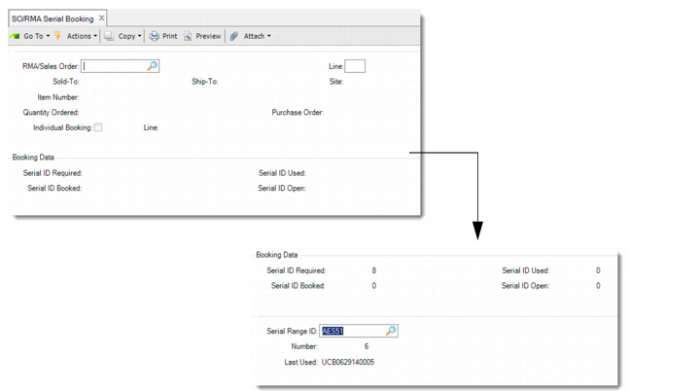
Enter the SO number and line. The system displays SO data, such as the sold-to, ship-to, item, quantity, and purchase order. Specify whether the system uses individual booking.
In the Booking Data frame, the system displays serial ID information, including the required and booked serial ID, the serial ID used, and the serial ID open.
If the Individual Booking field is set to Yes, enter the From serial ID and the To serial ID.
If the Individual Booking field is set to No, enter a serial range ID and the number of bookings.
Note: If your company employs the QAD Service/Support Management module, you can also use this function to book serial IDs for return material authorizations (RMAs).
SO/RMA Serial Booking (7.1.20)
RMA/Sales Order
Enter the sales order from which the system captures the serial IDs and books (creates) serial IDs.
Line
Enter the specific line from which the system captures the serial IDs and books (creates) serial IDs.
Individual Booking
Specify whether you enter serial IDs manually or by specifying a serial ID range:
Yes: You create serial bookings manually. You are required to specify a From Serial and To Serial range. The system books the IDs for the range.
No: You are required to specify a serial ID range that is predefined in the system. The system books the serial ID automatically using the entered serial range.
Serial Range ID
Accept or specify the serial range ID for which the system creates serial IDs.
Number
Accept or enter the number of serial books to capture for the SO.
From Serial
Enter a valid serial ID as the first serial ID in a range for this site, address, item, and pack code combination.
To Serial
Enter a valid serial ID as the last serial ID in a range for this site, address, item, and pack code combination.