Truck Load
Use Truck Load (7.8.4) to identify which master packs or loose serialized items staff have loaded into a truck. The system verifies that all master packs or loose serialized items linked with the pre-shipper/shipper have been physically loaded into the truck. Non-serialized loose inventory of an SO pre-shipper/shipper cannot be truck loaded.
You can use this program either before or after you confirm a shipper. Multiple users can use this program to load packs into trucks.
For SO (or customer scheduled order) Returns, the system does not support truck load for return pre-shippers/shippers. Also, for SO picking, when you pick a pack for a return pre-shipper/shipper, the system marks the pack as not loaded.
You can use the .NET UI Pre-Shipper/Shipper Truck Load Browse Collection to view the status of a truck load. The browse collection provides shipper data, and also tells you the total master packs, loaded master packs, and master packs and loose serialized items linked with the pre-shipper/shipper. You can complete loading using the Truck Load program.
Navigation
Use the following procedure to verify serialized packages that you load into a truck.
1 Enter shipper information.
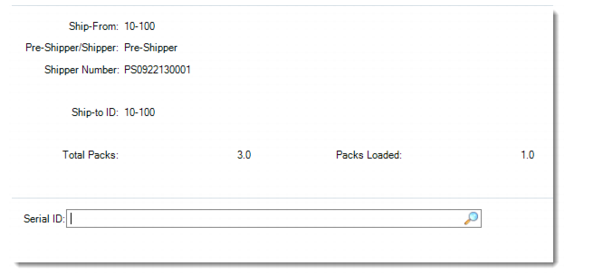
The system displays the ship-to ID, the number of the total packs, and the number of the packs loaded.
2 Enter the serial ID of the master pack or loose item to load into the truck.
After you enter the serial ID of the master pack, the system updates the value of Packs Loaded.
3 The system determines whether there are master pack or loose item serial IDs not loaded yet. When there are, the system displays a message prompting you to display the master packs not loaded. When no unloaded packs exist, you press Cancel to return to the first frame; however, the system maintains the shipping information.
Truck Load (7.8.4)
Ship-From
Enter the site from which the per-shipper/shipper is shipped. The default is the last accessed pre-shipper/shipper record.
Pre-Shipper/Shipper
Specify either a pre-shipper or a shipper. The default is pre-shipper.
Shipper Number
Specify the pre-shipper or shipper number.
Ship-To ID
Displays the ship-to address code to which this pre-shipper/shipper is to be delivered.
Total Packs
Displays the total number of the master packs of the pre-shipper or shipper.
Packs Loaded
Displays the number of packs loaded into the truck.
Serial ID
Enter the master pack or loose serialized item to load into the truck for the specified pre-shipper/shipper. Do not enter a serial ID that is attached to a return pre-shipper or shipper.