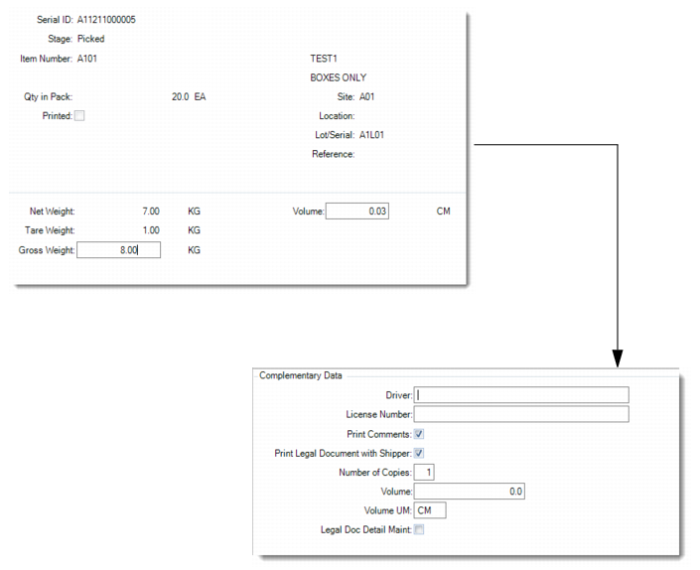
Shipping Data Maintenance
Use Shipping Data Maintenance (7.8.6) to record actual measured logistics data of a master pack or loose serialized item linked with a pre-shipper/shipper. This function does not provide you with the ability to maintain the weight of non-serialized loose inventory linked with a pre-shipper/shipper.
1 Enter the serial ID of a master pack or a loose serialized item linked with an SO pre-shipper/shipper.
You can see information about:
• The stage of the serial ID
• The item and its description if only a single item links to the serial ID
• The quantity in the pack
• The site
• The lot/serial and reference if there is a single lot
2 In the Weight frame, update the volume and gross weight according to actual measured logistics data.
Note: The Net Weight field and the Tare Weight field are read only. After you update the gross weight according to the actual weighed value, the system adjusts the tare weight and the net weight. The system also updates the weight values in the Pre-Shipper/Shipper Workbench to make them consistent with data in Shipping Data Maintenance.
3 In the Complementary Data frame, provide additional information as required by the legal document and indicate whether you want to print the legal document immediately.
Shipping Data Maintenance
Serial ID
Enter the serial ID of a master pack or a loose serialized item for which you want to update the gross weight and volume.
Volume
Enter the volume of the master pack or item. The value defaults from the pre-shipper or shipper.
Gross Weight
Enter the gross weight of the master pack or item. The value defaults from the pre-shipper or shipper.
Driver
Optionally enter the name of the carrier vehicle’s driver. This field is for reference only and appears on some legal documents.
License Number
Optionally enter the license number of the carrier’s vehicle. This field is for reference only and appears on some legal documents.
Print Comments
Specify whether to print shipper comments on the legal document.
Print Legal Document with Shipper
Choose Yes to immediately print the legal document along with the shipper. If you choose No, you can print the legal document later using Legal Document Print (7.10.4). This value defaults from the Print Legal Document option in Legal Document Control (7.10.24).
Number of Copies
Specify how many copies of legal documents you want to print.
Volume
Enter a code indicating the amount of space the inventory occupies.
Volume UM
Enter a unit of measure in which the net weight is expressed, such as CF, SF, CM. This field is validated against predefined values entered in Generalized Codes Maintenance for field pt_size_um, if any.
Legal Document Detail Maint
Choose Yes to review and maintain legal document details.