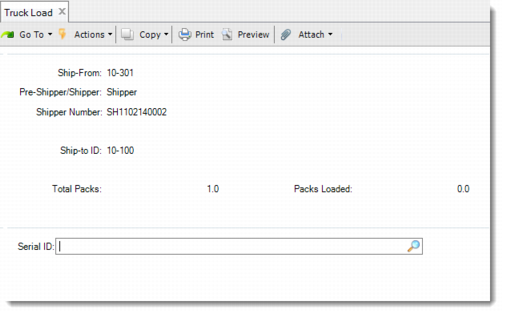
DO Truck Load
Use Truck Load (12.9.4) to identify which master packs or loose serialized items have been loaded into a vehicle. The system verifies that all master packs or loose serialized items linked with the DO pre-shipper/shipper have been physically loaded. Non-serialized loose inventory of a DO pre-shipper/shipper cannot be truck loaded.
Multiple users can use this function at the same time to load packs into trucks.
Note: You can perform truck loading before or after confirming the DO pre-shipper/shipper. If you load a serial ID after confirming the DO pre-shipper/shipper, the system updates the shipping history. But, if the In-Transit site is in a domain other than the supply domain, you are not allowed to do truck loading after you confirm the pre-shipper/shipper.
You can use the Pre-Shipper/Shipper Truck Load browse collection to view the status of truck loading. The browse collection provides pre-shipper/shipper data, the total master packs, loaded master packs, and master packs and loose serialized items linked with the pre-shipper/shipper. All the master packs and loose serialized items are listed in the Truck Load Serial Browse drill-down browse. After you use Truck Load (12.9.4) to load a master pack or loose serialized item into the truck, the Loaded field is Yes for the serial ID. You can complete loading using the Truck Load function.
Navigation
Use the following procedure to verify serialized packages that you load into a truck.
1 Enter the DO pre-shipper or shipper information associated with this truck loading.
The system displays Ship-to ID, the number of the total packs, and the number of the packs loaded.
Note: The system does not support truck loading for return pre-shipper/shippers. So you cannot enter a return pre-shipper/shipper here.
2 Enter the serial ID of the master pack or loose item that is linked with the current pre-shipper/shipper and being loaded into the truck.
Then the system updates the number of packs loaded, which is displayed in the Packs Loaded field.
If you enter a serial ID that is already loaded, the system displays a warning message and prompts you to unload it. If you specify Yes, the system unloads it and updates the Packs Loaded value.
3 When you click Back to finish loading, the system determines whether there are master pack or loose item serial IDs not loaded yet. When there are, the system prompts you to display the master packs not loaded. When all the master packs and loose serialized items linked with the current DO pre-shipper/shipper are loaded, the cursor returns to the first frame.
Truck Load (12.9.4)
Ship-From
Enter the site from which the pre-shipper/shipper is shipped. The default is the last accessed pre-shipper/shipper record.
Pre-Shipper/Shipper
Specify either a pre-shipper or a shipper. The default is pre-shipper.
Shipper Number
Specify the pre-shipper or shipper number.
Ship-To ID.
Displays the ship-to address code to which this pre-shipper/shipper is to be delivered.
Total Packs.
Displays the total number of master packs of the pre-shipper or shipper.
Packs Loaded.
Displays the number of packs loaded into the truck.
Serial ID.
Enter the master pack or loose serialized item to load into the truck for the specified pre-shipper/shipper. Do not enter a serial ID that is attached to a return pre-shipper or shipper.