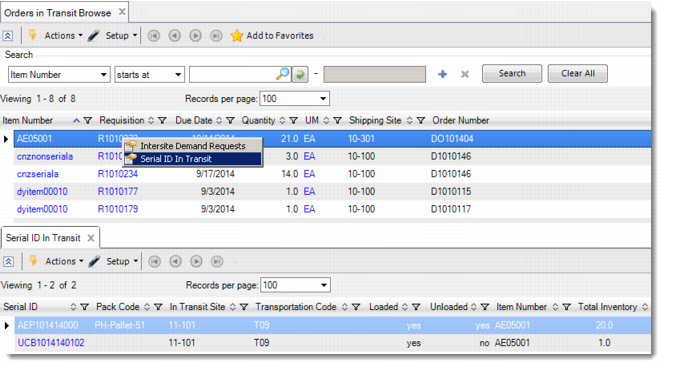
Viewing Serial IDs in Transit
In the domain where the In-Transit site belongs, use the Orders in Transit Browse to view the serial IDs of master packs and loose serialized items linked with an in-transit DO request.
Note: Returning serial IDs are not considered in this browse.
In Orders in Transit Browse, right-click the requisition number and select Serial ID in Transit to open the drill-down browse. You can view the following information of the linked serial IDs:
• Pack code
• In-transit site, transportation code, lot/serial, and reference
• Whether the serial ID is recorded as loaded into the truck in the supply site
• Whether the serial ID is recorded as unloaded from the truck in the demand site
• The item number if the serial ID is linked with a single item
• The total inventory linked with the serial ID and the unit of measure
• The DO request if the serial ID is linked with a single DO request
• The DO Shipper
Serial IDs in Transit
Right-click the serial ID and you can also see the following drill-down browses:
• Order Information
• View Downstream Pack
• View Shipping History