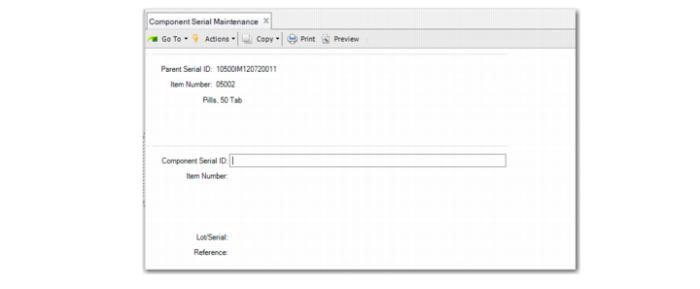
Component Serial Maintenance
Use Component Serial Maintenance (16.15.25) to maintain component serial IDs for imported parent serial IDs. You can also delete component serial IDs.
Make sure that the parent serial ID is for an item, not a pack, and is in the Pending, Active, Picked, Consumed, Aggregated, or Component stage. Also make sure that the master pack serial IDs are in the Pending, Active, Picked, or New stage.
The system validates the master serial ID and prompts you to enter a component serial ID. When the component serial ID is new to the system, the system creates the serial ID and sets its stage to New.
When you enter an existing serial ID, make sure that its stage is Booked, Decommed, or Consumed. When the serial stage is Consumed, you can leave the item number, lot/serial, and reference fields blank as the system obtains them from serial master records.
When the component serial stage is Booked, make sure that it is booked to the same WO or SO (or customer scheduled order) line as the parent serial ID or the parent master-pack of the parent.
To delete a component serial ID, press F5 or the Delete key. The system validates the link with a parent serial ID, then decommissions the component serial ID.
Component Serial Maintenance (16.15.25)
Parent Serial ID
Enter or scan the parent serial ID. The parent serial ID has to be an item; it cannot be a pack.
The parent serial ID stage is required to be Pending, Active, Picked, Consumed, Aggregated, or Component.
Item Number
The item number for the parent serial ID.
Component Serial ID
Enter the component serial ID. When the serial ID does not exist, the system creates it and sets the stage to New. The system updates component serial ID master records with the serial ID.