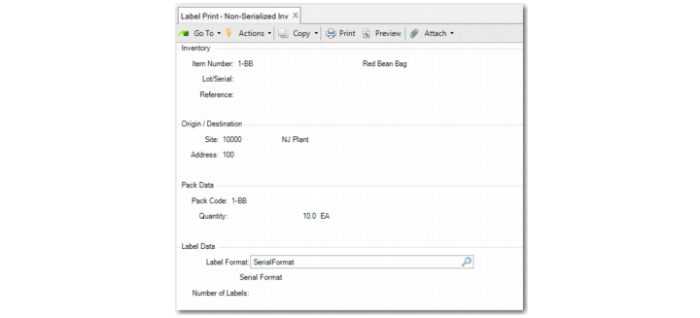
Label Print - Non-Serialized Inventory
Use Label Print - Non-Serialized Inventory (3.3.1) to print labels for packs or items that are not serial controlled. You enter all values to print. You can also use this function to print informative labels that are not created for a pack or item.
You enter the item, lot/serial, and reference, then enter data in the Origin/Destination frame. In the Pack Data frame, enter the pack code and the quantity in the pack data. Enter the format in the Label Format frame and the number of labels to print. Once you enter the quantity to print, select the printer in the Output field.
Once you enter the values, you can select the label format, then choose to print the labels.
Label Print - Non-Serialized Inventory (3.3.1)
Item
Enter the item number for which the system prints labels or leave blank. When site, pack code, item, lot, reference, and quantity are blank, the system displays a warning before printing.
Lot/Serial
Enter the lot/serial of the item or leave blank. When site, pack code, item, lot, reference, and quantity are blank, the system displays a warning before printing.
Reference
Enter the reference of the item or leave blank. When site, pack code, item, lot, reference, and quantity are blank, the system displays a warning before printing.
Site
Enter the site in which the goods are placed or leave blank. When site, pack code, item, lot, reference, and quantity are blank, the system displays a warning before printing.
Address
Enter the address to which goods ship, a site for distribution orders, or a supplier for purchasing.
Pack Code
Enter the pack code for which the system prints labels or leave blank. When site, pack code, item, lot, reference, and quantity are blank, the system displays a warning before printing.
Quantity
Indicate how many items are held in the pack or leave blank. When site, pack code, item, lot, reference, and quantity are blank, the system displays a warning before printing.
Label format
Select the label format the system uses when printing labels. The system locates the default label format, based on site, pack code, and item when defined in Pack Label Format Maintenance.
Number of Labels
Indicate how many labels are printed in this transaction.