Tracking and Tracing Shipping Data
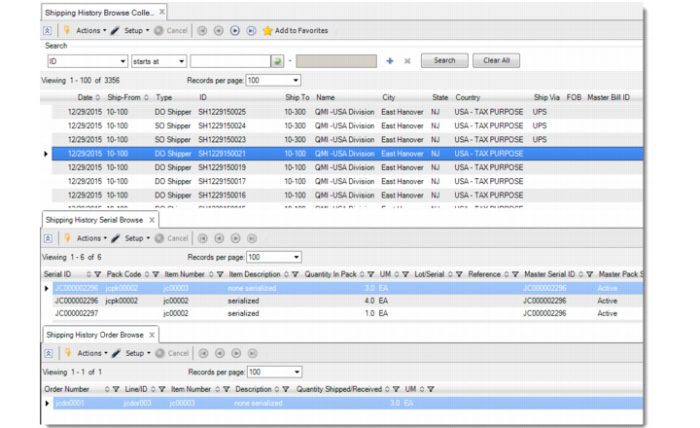
You can use the Shipping History browse collection to view shipping data for serialized items. The top browse shows the date; ship-from; type of shipper (PO Shipper, SO Shipper, and DO Shipper); shipper ID; and other related shipping data. Supporting browses, which reflect data based on your selection in the top browse, show shipping history based on serial ID data and shipping history based on order data.
Shipping History Browse Collection
You can view all serial numbers that shipped out in a shipment related to an invoice in:
• Pre-Shipper/Shipper Confirm (7.9.5): Print and view serial IDs in the Item Serial ID Shipped section when you set Print Invoice to Yes.
You can use the Shipping History browse collection to view all packs and item serial IDs for a return-from-customer shipper, too. When you return inventory items, the system displays the entire hierarchy from master pack to item serial IDs as well as picking information and kit components serial IDs; however, the system does not record or display regular component serial IDs. You can also view the data in the Shipping History browse collection.
• Invoice Post and Print (7.13.4) or Invoice Print or Reprint (7.13.12): Print and view all item serial numbers in the Lot/Serial Numbers Shipped section when Print Lot/Serial Numbers Shipped is set to Yes.
Note: Using these programs to view serial IDs, when you ship a unit pack holding serialized item to multiple sales order lines, the system displays all item serial IDs of the pack for each sales order line. When the item is a non-serialized item, the system does not print item serial IDs.
• .NET UI Shipping History Browse Collection: Display shipping history for SO and DO shipping, PO receiving and return, and SO (or customer scheduled order) returns.
• .NET UI Item Serial ID supporting browse in the Invoice History browse collection: View all serial numbers in a shipment related to the invoice. The Item Serial ID browse displays all item serial IDs shipped based on the invoice and also includes the shipper and order ID, line, item number, UM, lot/serial number, and reference.
Note: When you ship a unit pack holding serialized item for multiple order lines, the browse displays all item serial IDs in the box for each SO line.