QAD 2017 Enterprise Edition
>
User Guides
>
System Administration
>
System Interface
>
Using Field and Program Help
Using Field and Program Help
The system provides two types of online help: program (also called procedure) and field help. Program help explains what the current function or program you are working within does. Field help describes particular fields.
You can view these help records in either HTML or character format. The content of the HTML and character help files is identical. You can add your own information to the help; it displays under a heading of User Help in both character and .NET UI.
Note: QAD .NET UI displays the character help data in an HTML format. Any changes you make to character help are also visible in the QAD .NET UI.
In the QAD .NET UI, view field and program help by pressing F1. In the character interface, view field help by pressing F2 with the cursor in the field. Press F2 a second time and program help displays. No keyword searches or hypertext links are available in character help.
Adding User Help
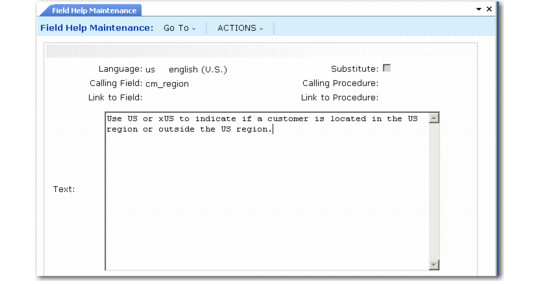
Use Field Help Maintenance (36.4 13.1) to add to the character-format help delivered with your system.
Field Help Maintenance (36.4.13.1)
Custom text entered in Field Help Maintenance appears at the top of the help record.
Printing Help
You can print out portions of the field and program help to supplement your user guide set. Printed field help is available through Field Help Report (36.4.13.2). The Procedure Help Report (36.4.13.4) prints program help in alphanumeric ranges by program name.
The Field Help Book Report (36.4.13.3) enables you to print a book containing all field help. Choose units as small as one field and as large as an entire module.
Local Vars
Clear this option to exclude local variables. These are field names created within a program, not drawn from the data dictionary. In reports, the From and To fields are often local variables. Usually, help for local variables is not as significant as database fields.
Update Only
Select this option to limit output to fields that can be changed.
Where-Used, Maximum
Disable the Where-Used option to keep the system from printing a where-used list after each help item. Some database fields are used throughout the database, and a complete where-used list can be very long. If selected, limit the length of the where-used list by entering a value in Maximum.