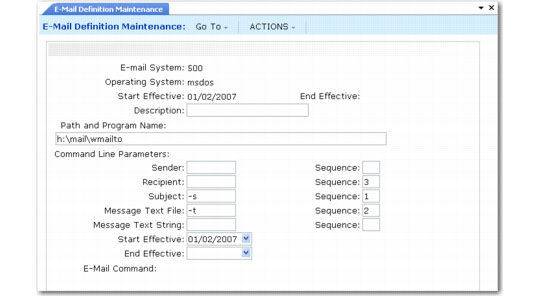
E-Mail Definition Maintenance
Set up a command line in E-Mail Definition Maintenance (36.4.20) for each system you want to access. Then, in User Maintenance (36.3.1), specify an e-mail definition and address for each user. The system uses the address as the sender of e-mail messages.
Be sure that an output device is defined in Printer Setup Maintenance (36.13.2) that has Destination Type set to Email. This is described in
Setting Up Printers. When you select the associated device in the Output field in programs throughout the system, the resulting report is sent to specified e-mail addresses.
Before you implement E-Mail Definition Maintenance (36.4.20), refer to the e-mail application documentation or consult with your e-mail system administrator to determine if the application you are using provides an operating-system command interface. If it does not, various shareware products provide e-mail command-line interfaces.
E-Mail Definition Maintenance (36.4.20)
E-Mail System
Enter an alphanumeric code that identifies an e-mail system your company uses. This can be a number or a shortened version of the application name. You can use the same code for more than one record to give users access to multiple systems. For example, you can define both a UNIX system and a Windows system with the same code so that a user can log on to either system with the same user ID.
Operating System
Enter the name of the operating system on the user’s computer. This is not necessarily the same operating system as the computer where the QAD databases reside. Valid values are UNIX and WIN32.
Start Effective
Optionally enter the first date this system is available for use.
Description
Enter a brief description of this system.
Path and Program Name
Enter the complete path to the executable e‑mail application file; for instance:
F:\apps\shared\email\blat.exe
End Effective
Enter the last date this system is available for use. This is an optional field.