QAD 2017 Enterprise Edition
>
User Guides
>
System Administration
>
System Interface
>
Monitoring User Sessions
Monitoring User Sessions
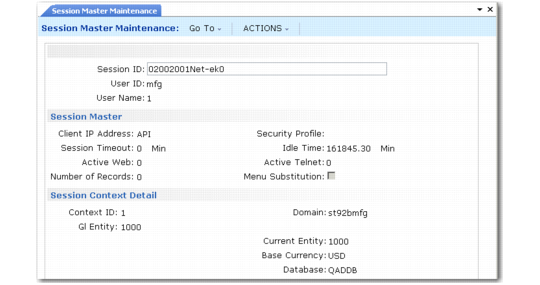
Use Session Master Maintenance (36.4.22) to view information about users who are currently logged in to the system through the .NET UI. This information displays in the form of session records, each identified by a unique session ID that is generated by the system. A session record is automatically created when a user successfully logs in to the system from the .NET UI and is deleted when the user logs out.
Session times are recorded and displayed in Universal Time, Coordinated (UTC).
Session Master Maintenance (36.4.22)
Only some of the settings displayed on this screen apply to .NET UI sessions. You can ignore the following: Active Web, Number of Records, Security Profile, Active Telnet, Menu Substitution, and Context ID.
The session context detail displays information about the current workspace (domain). One user session can be associated with multiple contexts if programs have been activated in more than one workspace.
You can also monitor the status of sessions for HTML maintenance programs, reports, and inquiries using Connection Manager, which is described in detail in the installation guide for your system.