QAD 2017 Enterprise Edition > User Guides > System Administration > Batch Processing and Daemons > Integrating XML Documents > Component Schema and Sample Files
  
Component Schema and Sample Files
Each QAD Enterprise Edition calling program is associated with an XML schema file. The schema file provides the definition of the component structure.
The XML schema for a calling program such as Supplier Invoice (BCInvoice.XSD) contains all possible data entry fields in the component, and details the component tables. It also includes the information required to start data iterations and information on the calling procedure.
The tc_Rowid and tc_Parentrowid fields in each table section indicate the parent or child table relations.
Sample values for these fields are displayed in the component sample file.
Supported Components
The following table lists the components that you can import using Excel, QXtend Inbound (QXI), or the XML Daemon:

Component Schema File
s
bbudgetgroup
bcashgroup
bcdocument
bcinvoicejournalentry
bcurrency
bddocument
bdebtorcreditrating
bdebtorenduser
bdebtorshipto
bdebtortype
bdinvoice
bdinvoicejournalentry
bdomain
bemployee
bexchangerate.xsd
bexchangeratetype
bgl
bglcalendar
bglmask
bjournalentry
blanguage
blayer
bmirroringgl
bmirroringjournal
bpaymentcondition
bpaymentformat
bpaymentgroup
bperiod
bprofile
bproject
bprojectgroup
bprojectstatus
bpurchasetype
breason
broundingmethod
brole.xsd
bsaf
bsafconcept
bsafstructure
bsafstructurelink
bsettings.xsd
bsharedset
bstate
buser.xsd
buserrole
bvat
bvatbox
bvatgroup
bvatperiod
byearclosing


Sample XML Files
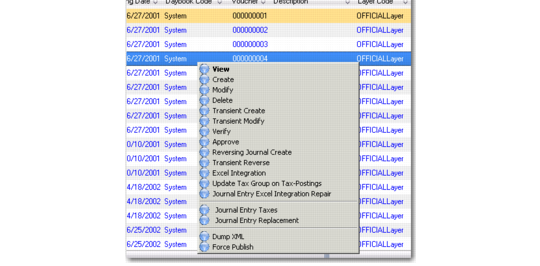
You can create a sample XML file for all components using the right-click Dump XML option available in browse results screens. The XML dump file is stored on the application server.

Journal Entry View, Dump XML
The Dump XML feature has two options:
Dump All Fields (QAD XML export format)
This option dumps every field in the browse to XML.
Only dump fields for import (QAD XML Import Format)
This option dumps only the fields you require if you are using the dump XML file to import external data into the application. The system removes the following non-essential fields from the XML dump:
tContextInfo.tcInvolvedCompanyCodes
tContextInfo.tcCorrelationId
tContextInfo.tcObjectIdentifier
*_ID fields for each table in the XML document/dataset
tc_status fields for each table in the XML document/dataset
The XML files created with this option conform with the schema file for the component, and provide sample values for all fields and table relations for that record. The data contained in the dump XML file is specific to the records you selected.