Running the Utility
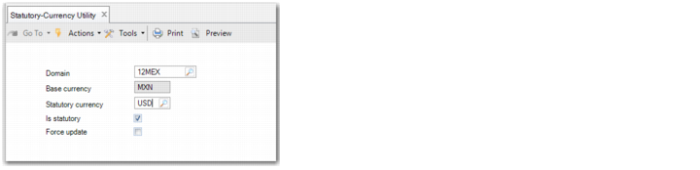
Use the Statutory-Currency Utility to update statutory currency values for a domain.
Statutory-Currency Utility
Domain
Specify the domain for which for want to run the statutory currency conversion.
You can only run the Statutory-Currency Utility for a single domain at a time.
Base Currency
This field displays the base currency of the domain and is read only.
Statutory Currency
Specify the new statutory currency value that you want to convert to. The default value for this field is the current statutory currency for the domain.
Is Statutory
Manually update the field to reflect the situation that will exist after the statutory currency conversion is run.
Select this field if the base currency will not be the same as the statutory currency after conversion.
Clear this field if the base currency will be the same as the statutory currency after conversion.
Note: The statutory currency becomes active if it is different than the base currency. Therefore, this field acts as an additional validation to remind you that you are activating or deactivating a second domain-level currency.
Force Update
Select this field if you do not want to change the current statutory currency, but you want the system to recalculate the statutory currency amounts.
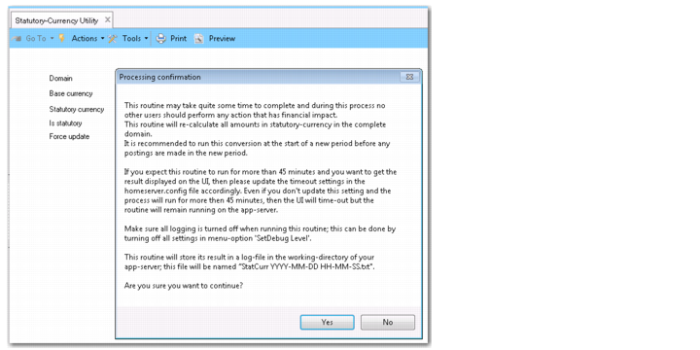
When you click Execute to run the statutory currency conversion, the system displays a Processing Confirmation window. Click Yes if you are sure that you want to proceed with the conversion. To cancel the conversion, click No.
Statutory-Currency Utility, Processing Confirmation
Important: When you are finished running the Statutory-Currency Utility, log off QAD Enterprise Applications and log back on to the updated domain before you can see the changed currency setting. This step is required because some domain-level parameters are cached in the session memory.
When the Statutory-Currency Utility is finished, you can restart the History daemon and the Balance daemon, but the daemons will take time to rebuild the balance totals, including the new statutory currency balances. Reports that use the summarized transaction history table (PostingHist) to display GL account balances are only accurate when the History daemon has processed all records in its queue. Use the History Daemon Monitor (36.14.16.1.3) and the Balance Daemon Monitor (36.14.16.2.3) screens to check the status of the daemons.