Customization Overview
QAD application component code is based on a standard code template, and you can create customizations for the following standard application activities:
• Creating an object
• Modifying an object
• Deleting an object
• Browsing an object
• Generating a report
• Retrieving data for a field into the object form
• Retrieving related activities for an activity
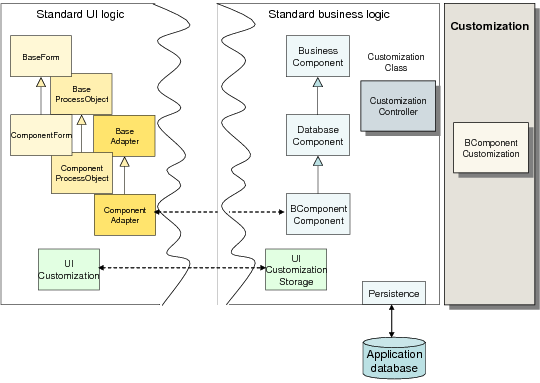
You customize any of these activities by writing code that is activated with a publish-subscribe mechanism, in which a customized event is published before or after the component code. A code template (BComponent.p) is provided for each business component, which contains the procedure definitions for every before or after event that can be customized, and which you use to implement the customization. The template code is commented, and to hook the event code into the component process, you uncomment the event and add the necessary component code. This process is called non-intrusive customization, because the customized code is added before or after the standard code, but does not intrude on the standard code itself. Template code does not contain any application framework code, but does contain descriptions of methods and method parameters.
Each component-based application also contains a customization controller class CustomizationController. This class controls the available customization pieces and their implementation, and ensures that the correct customized code is executed in the right order for the different processes.
Component Customization
Customizations are run on the same appserver as the internal code, and are portable from one application instance to another. You can also call standard methods and queries from within customized code.
Supporting Documentation
When customizing, you can refer to the QAD Financials API documentation for information on activities, queries, and methods for components.
The API documentation is provided in HTML format with each QAD Enterprise Financials release. It is stored in the HTMLdocumentation folder in your installation directory in a file called QADFIN_Documentation.zip.
The API documentation represents the documented class model for the application business layer, and is written by QAD developers.
See
Tables and Mandatory Fields for more information. In addition, the API documentation is described in detail in the
Best Practices for Customization training course.
QAD Support can also provide details on integrating with Financials using APIs on the following topics:
• General Information
• Supplier Invoice and Matching
• Tax Calculation / GTM