Exporting Customizations
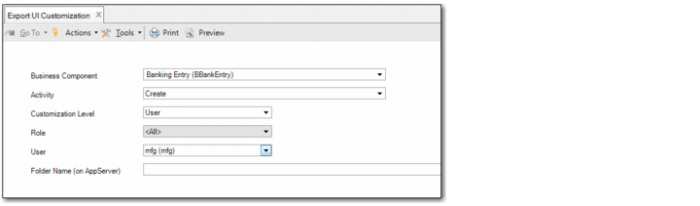
Use Export UI Customization (36.4.26) to export customizations for business component activities including:
• Customizations created in Design Mode, which are exported to BControlProperty.xml.
• Saved grid settings, which are exported to BControlProperty.xml. To define grid settings, right-click on the header of any grid and choose the Columns option.
• User-defined field definitions, which are exported to BCustomField.xml.
• User-defined component definitions, which are exported to BUDCConfiguration.xml.
• Stored searches, which are exported to BStoredSearch.xml.
• Report variants, which are exported to BReportVariant.xml.
Export UI Customization
Business Component
Select the business component for which to export customizations.
You can also select the All option to export customizations for all business components.
Activity
Specify the business component activity for which to export customizations; for example, Create, Modify, View, Delete, Monitor, Configure, or Maintain.
You can select any activity for the business component you select in the Business Component field. You can also select the All option to export customizations for all activities for the selected business component.
The Activity field is not available if you select the All option in the Business Component field.
Customization Level
Select the customization level for which to export customizations for the business component and activity. The options are:
All. Select this option to export all customizations for the business component activity.
Role. Select this option to export all customizations for the business component activity created by users with a particular role. If you select Role, you must specify the role for which you want to export customizations.
System. Select this option to export all customizations for the business component activity that were created using the General option. These customizations are at system level, and are not tied to a particular role or user.
User. Select this option to export all customizations for the business component activity that were created by a particular user. If you select User, you must specify the user for which you want to export customizations.
Role
Specify the role to export all customizations for the business component activity that were created by users with this role. The Role field becomes available if you select the Role option in the Customization Level field.
User
Specify the user to export all customizations for the business component activity created by this user. The User field becomes available if you select the User option in the Customization Level field.
You can also select the All option to export customizations for all users.
Folder Name (on Appserver)
Specify the full path of the folder to which you want to export the customizations. This field is mandatory.