Using Bank File Format Import to Install the Format
Each imported format file is specific to an individual bank and contains the payment information and attributes required for that bank.
The format definition files are usually delivered by the bank in zipped XML format. You unzip the files to a server directory and then load the files into the system using Bank File Format Import (31.23).
This program creates mapping records that let the system process incoming files correctly, using the configuration you defined in EDI eCommerce. It also generates the outbound files that meet the requirements of the receiving bank. Additionally, it updates a set of financial setup tables that define the payment format for each bank.
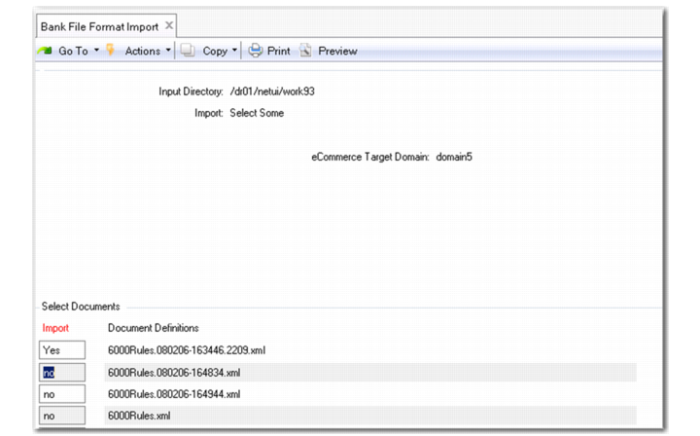
Bank File Format Import
1 Specify the Input Directory in which the unzipped XML files are stored.
2 Select Some, All, or a single bank XML file.
The eCommerce domain is a read-only field indicating the domain that the trading partner information will be loaded into. If the definition needs to be loaded into a different eCommerce domain, you must exit this screen, change to a different eCommerce domain and re-open this menu option. An eCommerce domain is associated with one or many QAD domains. During export processing, the QAD domain is used to determine the eCommerce domain in which to process under.
Some .NET UI installations do not display a scroll bar on this screen for the list of XML files available for import. If a great many XML files are listed, you can change the Bank File Format Import program to display in Terminal mode, by selecting the menu Properties and changing the Open With value to Terminal. Close the program and start it again. When in Terminal mode, you can use the keyboard to scroll through the list of available XML files.
3 Review the library import log for any errors or warnings.
A typical warning is that the function directory does not exist or that a particular user-defined function will not compile. The log file is named library-import-<today's date>-(nnnnnn).log. The value nnnnnn is incremented each time an import occurs during the day, which prevents the overwriting of an existing log file. This log file can be found in the work directory of Progress (appserver) on the server.
Note: For outbound definitions, you should verify the Transmission Group Destination directory and File Name Counter. This can be accessed through Transmission Group Maintenance (35.13.13). A Transmission Group defines the destination of the bank file being exported and what counter definition is used to generate the file name. The outbound destination directory is where the bank drivers create the bank files, and where you retrieve the files before sending them to the bank for processing.