Delete Customizations
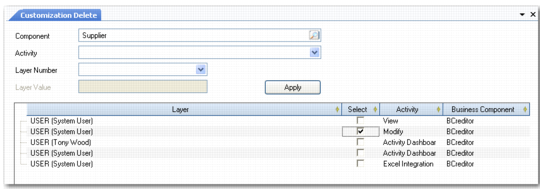
Use Customization Delete (36.4.19) to delete customizations to the UI. If a customization has been applied to a business component, you can view it in the Customization Delete screen.
Customization Delete
Field Descriptions
Component
Select the business component for which you want to view customizations.
Select
Click this check box to indicate that you want to remove the customization.
Activity
Select the activity from the drop-down list. This list of activities available depends on the selected component. The default value is All.
Layer Number
Select the customization level (user, role, system).
Layer Value
If you selected User or Role in Layer Number field, use this lookup to select a specific user or role.
Click Apply to populate the result grid. Select the customizations you want to delete and click Delete to remove them.