Event Daemon
The Event daemon processes Financials business events and publishes them to a defined destination. The system publishes events to a directory on the application server or to the QXtend Server for replication to other Financials instances or to third-party financial applications.
A business event in this case can be any modification to a Financials business object, such as an update to customer or supplier base data. By publishing the event, the system ensures that the update is replicated to other instances and so eliminates the need to extract the data directly from the database. The event consists of complete object data with context information that is published in XML format.
The Financials application uses a buffer queue within the running transaction to prepare messages before they are sent out. This ensures that no events are lost during system down-time and that no disruption of service occurs. Events are then published in XML format using a daemon process which routes the message to the specified destination.
Event publishing has three components:
• Event Destination
Create an Event Destination to define the name of the event and the type and details of the server connections.
• Event Configuration
Use Event Configuration to activate the publishing mechanism, configure which components and status transitions will trigger events—for example, supplier invoice creation—and indicate the destination queue of the event.
• Event Daemon
The Event daemon processes the events in its queue and displays the event message status.
Event Destination
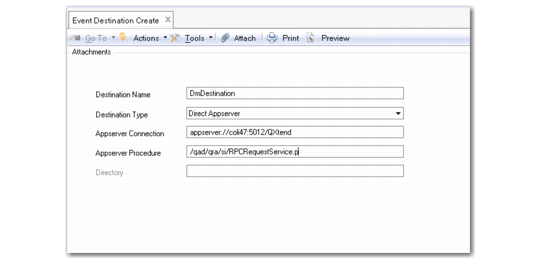
Use Event Destination Create (36.14.16.14.1) to define the name of the event and the type of messages it will contain. When you are using QXtend to export the events, you specify the connection to the appserver instance of QXtend Out (QXO) as the destination.
Event Destination Create
Field Descriptions
Destination Name
Specify a destination name (maximum of 40 characters).
Destination Type
Select a destination type:
Direct Appserver. The events are published to an application server. When you select this type, the Directory field becomes unavailable.
To Directory. The events are published to a server directory.
Appserver Connection
Specify an application server connection. The protocol for the server path is:
appserver://<hostname>:<nameserver port>/<application service name>
The default nameserver port for a daemon running on the main application server is 5162.
Appserver Procedure
Specify a procedure to be applied to the event.
This is the procedure that is called on the appserver. For QXO (QXtend Out) this typically is qad/qra/si/RPCRequestService.p
Directory
Specify a server directory. This field is available when you select a To Directory destination type.
Event Configuration
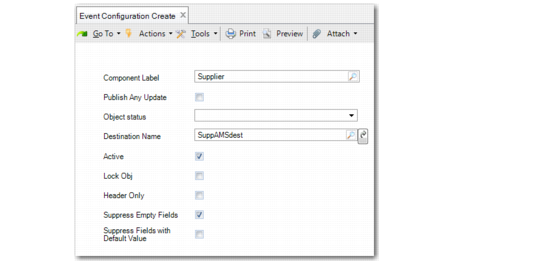
Use Event Configuration Create (36.14.16.15.1) to perform the following activities:
• Activate the publishing mechanism.
• Configure which components and status transitions will trigger events; for example, an update to Supplier base data.
• Select the destination of the event.
Event Configuration Create
Field Descriptions
Component Label
Choose the business component that will trigger an event.
Publish Any Update
Select this field if any type of update to the business component is to trigger an event. Selecting this field makes the Object Status field unavailable.
Object Status.
Choose the object status of the business component upon which the system will trigger an event.
Destination Name
Choose the name of a queue to which the event will be sent.
Lock Object
Select the field to lock the object for update after it has been published.
Active
Indicate if this is an active record.
Header Only
Select this field to publish event header details only.
Suppress Empty Fields
Select this field to exclude empty database fields from event publishing.
Suppress Fields with Default Value
Select this field to suppress all fields that contain the default value for that field as defined in the dataset.
If the default value of a numeric field is zero, all zero values are removed. If the default value of a Boolean field is False, all False values are removed. If the default value of a field is not null, fields with null values are not removed.
Force Publish
The Force Publish option is a right-click feature available on Enterprise Financials browses, which publishes a business event for the selected record. By publishing the event, the system ensures that the update is passed to the QXtend Outbound database and replicated to other instances of Financials or third-party applications. This facility eliminates the need for the other applications to extract the data directly from the Financials database.
In order to publish an event for a component, you must first define an event for the component using Event Configuration Create (36.14.16.15.1). In Event Configuration Create, you select the Publish Any Update field to ensure that all data updates for the business object for which you defined the event are published to QXtend.
Event Daemon
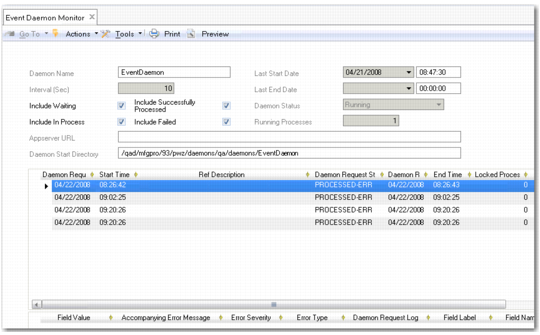
The Event daemon reads event messages in its queue, and processes them according to the event configuration. You configure and monitor the Event daemon in the same way as other daemons.
Event Daemon Monitor