Report Translation
The Report Translation activities (36.4.3) let you create, view, modify, and delete custom labels used in component-based reporting functions.
Using these activities, you can modify the standard QAD translations or create new translations. Labels are grouped by business component and, then, by report. The labels that are common to all reports of a business component are stored with a blank report name. The labels that are specific to one report reference the report name.
The report labels are stored in the database and are retrieved at run-time (report execution) in the correct language and sent to the Crystal reports viewer. This viewer receives the report data and labels from the application and formats them according to the layout in the .rpt file.
For standard QAD labels, the QAD Standard check box is selected and the Report Translation Code cannot be changed.
If you want to add a new label to a component and make it available to all reports for that component, ensure that the label is defined in the .rpt file with the correct Report Translation Code.
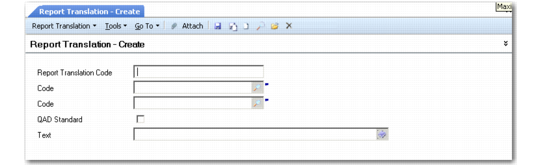
Report Translation Create (36.4.3)
Report Translation Code
Specify the Report Translation Code to use on reports and to which the translation is linked.
Business Component
Specify the business component to which the report belongs.
Report Name
Specify the report to which the translation applies.
QAD Standard
Select to indicate if the translation is a standard QAD translation.
Text
Type the translated text.