QAD 2017 Enterprise Edition
>
User Guides
>
Warehousing
>
Algorithms
>
Simulation
>
Lane Assignment Simulation
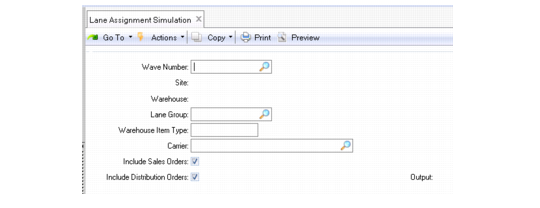
Lane Assignment Simulation
Use Lane Assignment Simulation (4.6.17) to test your lane algorithm assignments without actually modifying the inventory records in your database. The system displays or reports on the lanes that would have been used by the system if the simulation had been carried out as a real assignment.
Available lane assignment algorithms include:
1: Merge with same carrier. The system looks for a shipping lane in use for a given carrier.
2: Find empty shipping lane. The system looks for an unassigned shipping lane.
3: Find shipping lane by best load (active tasks). The system looks for a shipping lane with the lowest number of tasks assigned to it.
4: Find a dedicated unique lane for carrier. The system considers carriers assigned to a specific shipping lane in Lane/Dock Maintenance. A carrier can only be assigned to one shipping lane.
5: Find the last previously selected shipping lane to use when automatic wave release is active.
The system automatically populates the site and warehouse fields.
Lane Assignment Simulation
Wave Number
Enter the number of the wave for which you want to simulate a lane assignment. When you specify a wave number, the system automatically populates the site and warehouse
Lane Group
Enter a valid lane group for this function to consider.
Warehouse Item Type
Enter a valid warehouse item type for this function to consider.
Include Sales Orders
Indicate Yes to include sales orders in this lane assignment simulation.
Include Sales Orders
Indicate Yes to include distribution orders in this lane assignment simulation.