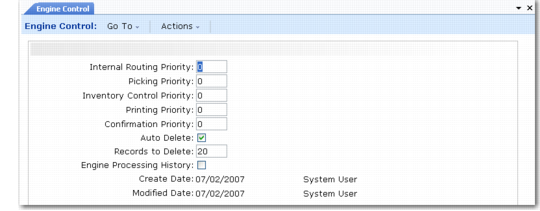
Setting Engine Control Parameters
Use Engine Control (4.7.24) to set up parameters for the engine processors and engine workfiles.
Engine Control (4.7.24)
Internal Routing Priority
Specify a priority value for internal routing tasks. The lower the number you specify, the lower the priority. The system processes the task with the highest priority as the next task that requires action.The default is 0 (zero).
This field defaults to the Priority field in Engine Workfile by Order Maint (4.7.13) and Engine Workfile by Date Maint (4.7.14) for engine workfiles that are a request for an internal routing.
Picking Priority
Specify a priority value for picking tasks. The lower the number you specify, the lower the priority.The system processes the task with the highest priority as the next task that requires action. The default is 0 (zero).
This field defaults to the Priority field in Engine Workfile by Order Maint (4.7.13) and Engine Workfile by Date Maint (4.7.14) for engine workfiles that are a request for picking.
Inventory Control Priority
Specify a priority value for inventory control tasks. The lower the number you specify, the lower the priority. The system processes the task with the highest priority as the next task that requires action. The default is 0 (zero).
This field defaults to the Priority field in Engine Workfile by Order Maint (4.7.13) and Engine Workfile by Date Maint (4.7.14) for engine workfiles that are a request for inventory updating or balancing.
Printing Priority
Specify a priority value for printing tasks. The lower the number you specify, the lower the priority. The system processes the task with the highest priority as the next task that requires action. The default is 0 (zero).
This field defaults to the Priority field in Engine Workfile by Order Maint (4.7.13) and Engine Workfile by Date Maint (4.7.14) for engine workfiles that are a request for printing.
Confirmation Priority
Specify a priority value for confirmation tasks. The lower the number you specify, the lower the priority. The system processes the task with the highest priority as the next task that requires action. The default is 0 (zero).
This field defaults to the Priority field in Engine Workfile by Order Maint (4.7.13) and Engine Workfile by Date Maint (4.7.14) for engine workfiles that are a request for confirmation.
Auto Delete
Indicate whether the system automatically deletes engine workfiles when the engine processor finishes processing them.
Yes (the default): The system automatically deletes engine workfiles when it finishes processing them.
No: The system does not delete engine workfiles when it finishes processing them.
Records to Delete
Indicate the number of records to delete. The default is 0 (zero).
Engine Processing History
Indicate whether the system maintains a history of the engine processing.
No (the default): The system does not keep engine processor history records.
Yes: The system keeps engine processor history records. You can use the programs in the Engine History Menu to view or delete the records.