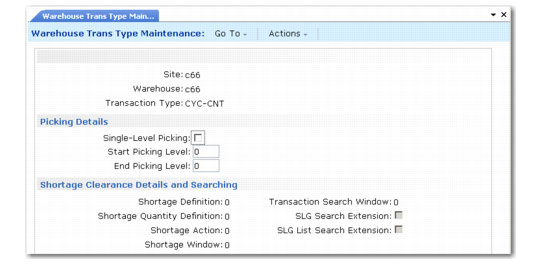
Shortage Clearance Details and Searching
The Shortage Definition, Shortage Quantity Definition, Shortage Action, and Shortage Window fields are used in the same way as in Transaction Type Maintenance.
Shortage Clearance Details and Searching
Transaction Search Window
To speed up processing, some of the picking algorithms consider the last location used for picking of a specific item when that item is to be picked again. The algorithm does this by searching backwards through previous transactions. However, you can limit the age of transactions that are searched in this way, because it is unlikely that the last location is still the most efficient for picking if the previous transaction is more than a few days old.
This field specifies the number of days that the algorithms should search backwards for previous transactions relating to the current item. For example, set this value to 1 if you want the algorithms to search only the transactions that were created today or yesterday.
SLG Search Extension
When doing a transfer with a user-provided destination location, if the destination is full, the put-away takes place in the storage location group of the destination location given by the user.
SLG List Search Extension
When doing a transfer with a user provided destination location, if the destination is full, the put-away takes place in the storage location groups linked to the list of SLGs defined at item/warehouse level of the destination location given by the user.