QAD 2017 Enterprise Edition
>
User Guides
>
Warehousing
>
Engine Processing
>
Archiving/Deleting Engine History Data
Archiving/Deleting Engine History Data
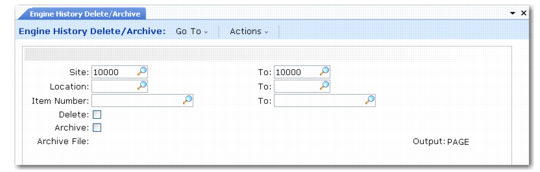
Use Engine History Delete/Archive (4.7.21.23) to delete or archive engine history data. You specify engine history data to delete/archive by a range of sites, locations, or item numbers.
You can set the Delete field to No to display the data first. Once you view the engine history data, you can set Delete to Yes to delete data. You must set both Delete and Archive to Yes to archive data. When both Delete and Archive are Yes and you click Next, the system displays the name of the archive file.
Engine History Delete/Archive (4.7.21.23)
Site and To
Specify a range of sites for engine processing history records you want to delete or archive.
Location and To
Specify a range of locations for engine processing history records you want to delete or archive.
Item Number and To
Specify a range of item numbers for engine processing history records you want to delete or archive.
Delete
Specify whether the system deletes and archives engine processing history records:
No (the default): The system does not delete records.
Yes: The system deletes engine processing history records and archives them if you set Archive to Yes, too.
Archive
Specify whether the system archives engine processing history records:
No (the default): The system does not archive records.
Yes: The system archives engine processing history records. You must set Delete to Yes, too, to archive files.
Archive File
The system displays the name of the archive file. This field is display only.