QAD 2017 Enterprise Edition
>
User Guides
>
Warehousing
>
Labor Management
>
Labor Management Control
Labor Management Control
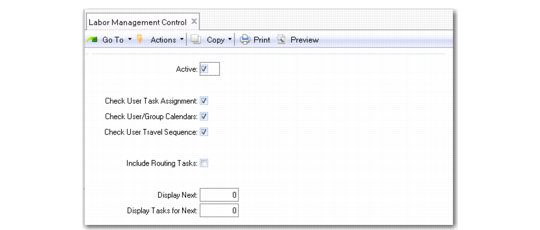
Use Labor Management Control (4.11.24) to activate Labor Management and set some default values for options in the Labor Management Workbench.
Labor Management Control (4.11.24)
Complete the fields as follows:
Active
If set to Yes, labor management functionality becomes active.
Check User Task Assignment
Indicate whether the Labor Management Workbench should check user-task assignment lists, or assign tasks irrespective of skill sets or experience.
Check User/Group Calendars
Indicate whether the Labor Management Workbench should check the user or group shift calendar, or assign tasks irrespective of time/date details.
Check User Travel Sequence
Indicate whether the Labor Management Workbench should check the user’s last know physical location prior to assigning tasks, or assign tasks irrespective of physical location within the warehouse.
Include Routing Tasks
Indicate whether the Labor Management Workbench should calculate the times and tasks using the complete routing as opposed to the individual routing sequence.
Display Next
Indicate how many tasks the Labor Management Workbench should display.
Display Tasks for Next
Indicate how many minutes worth of tasks the Labor Management Workbench should display.