QAD 2017 Enterprise Edition
>
User Guides
>
Warehousing
>
Labor Management
>
Defining Tasks
Defining Tasks
The following sections tell you how to define tasks in QAD Warehousing.
Task Maintenance
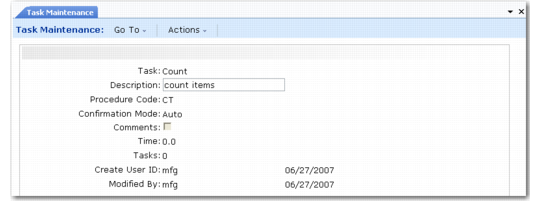
Use Task Maintenance (4.11.1.1) to create and update the tasks performed in a warehouse.
Task Maintenance (4.11.1.1)
Complete the fields as follows:
Task
Enter the task name, such as PICKING.
Description
Enter the description of the task. This description is typically related to labor management.
Procedure Code
Enter the 2-character procedure code such as PK for this task.
Confirmation Mode
Enter the default confirmation method for this task type.
• A confirmation mode of AUTO requires the user to perform a movement confirmation.
• A confirmation mode of MANUAL is confirmed by the confirmation engine.
Comments
Enter additional comments as required for this task.
Time
This display-only field defaults from the time you set in Task Time Maintenance (4.11.1.13).
Tasks
This display-only field depicts the number of confirmed tasks (warehouse transactions) for the task you are defining. The system stores the number of tasks and the average time per task; it uses the information in labor management reports to display pending tasks.