QAD 2017 Enterprise Edition
>
User Guides
>
Warehousing
>
Labor Management
>
Assigning Resources to Tasks
Assigning Resources to Tasks
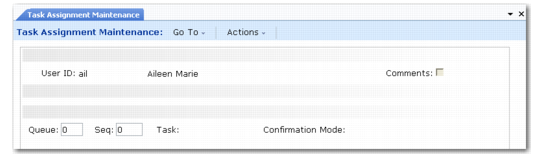
After defining the resources and tasks that are being undertaken within the warehouse, you must assign the tasks to the resources. This is achieved by using Task Assignment Maintenance (4.11.1.9).
Task Assignment Maintenance (4.11.1.9)
Complete the fields as follows:
User ID
Enter the name of the warehouse staff. An entry should be made for each warehouse staff.
Comments
Indicate whether additional comments are required for this task assignment.
Queue
Indicate the queue for this task. The queue contains a number of sequences, and queues are examined sequentially. Therefore, when the system is assigning tasks to resources, it checks all the sequences in queue 1 before queue 2. If multiple tasks exists for a user, the user is prompted to perform the task with the higher priority within the queue.
Sequence
Indicate the order within the queue for examining tasks.
Task
Indicate the tasks that are assigned to the specified employee (user).
Note: This does not assign a specific task; it indicates that the user can undertake this task, assuming some are available.
If two outstanding tasks exist within the warehouse—a pick and a receipt—and a user is defined with sequence 1 receipt and sequence 2 pick, the user is prompted to move the receipt first, since this has a higher priority within the queue.
Confirmation Mode
Indicate the default confirmation method for this task type.
• A confirmation mode of AUTO requires the user to perform a movement confirmation.
• A confirmation mode of MANUAL is confirmed by the confirmation engine.