QAD 2017 Enterprise Edition
>
User Guides
>
Warehousing
>
Labor Management
>
Labor Management Workbench
Labor Management Workbench
Use Labor Management Workbench (4.11.15) to automatically or manually assign resources to tasks. Automatically, the workbench assigns tasks to the most suitable resource, depending on task assignment, user/group calendars, and travel sequence. Manually, the workbench allows the operator to assign the resources to the tasks.
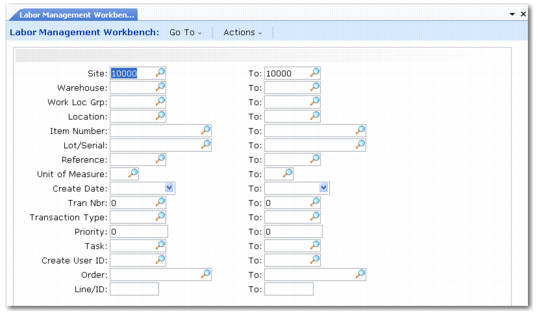
Labor Management Workbench (4.11.15)
Complete the fields as follows:
From and To Site
Indicate the From/To site range that should be included on the workbench.
From and To Warehouse
Indicate the From/To warehouse range that should be included on the workbench.
From and To Work Loc Grp
Indicate the From/To work location group range that should be included on the workbench.
From and To Location
Indicate the From/To location range that should be included on the workbench.
From and To Item Number
Indicate the From/To item number range that should be included on the workbench.
From and To Lot/Serial
Indicate the From/To lot/serial range that should be included on the workbench.
From and To Reference
Indicate the From/To reference range that should be included on the workbench.
From and To Unit of Measure
Indicate the From/To UM range that should be included on the workbench.
From and To Created
Indicate the From/To create date range that should be included on the workbench.
From and To Transaction
Indicate the From/To transaction number range that should be included on the workbench.
From and To Transaction Type
Indicate the From/To transaction type range that should be included on the workbench.
From and To Priority
Indicate the From/To transaction priority range that should be included on the workbench.
From and To Task
Indicate the From/To transaction task range that should be included on the workbench.
From and To Create User ID
Indicate the From/To transaction created by user ID range that should be included on the workbench.
From and To Order
Indicate the From/To transaction order number range that should be included on the workbench.
From and To Line/ID
Indicate the From/To transaction order line range that should be included on the workbench.
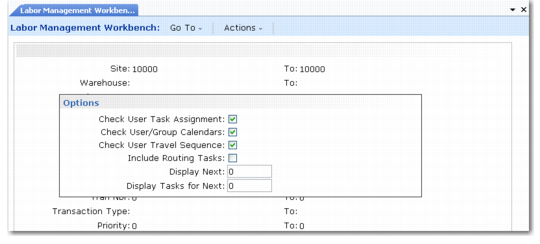
Labor Management Workbench, Options
Check User Task Assignment
Indicate whether the workbench should check the user or group task assignment.
Check User/Group Calendars
Indicate whether the workbench should check the user or group calendars.
Check User Travel Sequence
Indicate whether the workbench should check the user’s last known physical location prior to assigning tasks, or assign tasks irrespective of physical location within the warehouse.
Include Routing Tasks
Indicate whether the workbench should calculate the times and tasks using the complete routing as opposed to the individual routing sequence.
Display Next
Indicate how many tasks the workbench should display.
Display Tasks for Next (Minutes)
Indicate how many minutes worth of tasks the workbench should display.
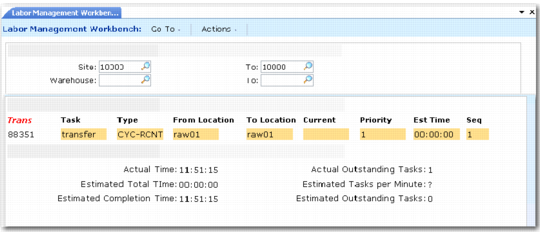
The Labor Management Workbench displays the current outstanding tasks based on the selection criteria entered in the first frame, together with the currently assigned warehouse staff, priority, and estimated time required to complete the task.
The lower frame displays the actual time that the report was generated, together with the estimated total time for all displayed tasks, and the estimated completion time for all displayed tasks.
Labor Management Workbench, Active Tasks
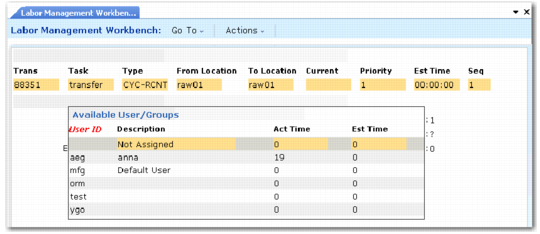
The operator can select the required transaction to display a list of all valid warehouse staff that can undertake this task and add additional users if needed.
Labor Management Workbench, Available Users/ Groups