QAD 2017 Enterprise Edition
>
User Guides
>
Warehousing
>
System Administration
>
Local Exit Routines Setup
Local Exit Routines Setup
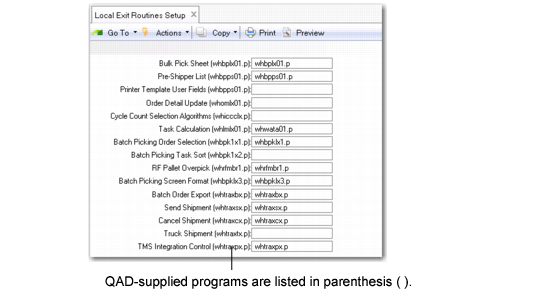
You can extend warehousing functions by specifying custom programs that you have modified for your specific requirements. Use Local Exit Routines Setup (4.23.10) to specify programs for selected functions.
For example, you can use Local Exit Routines Setup to define the program to call when warehouse staff replenish from a single pallet.
QAD Warehousing supplies a custom program for each function. The supplied program is shown in parenthesis ( ) with each function.
Local Exit Routine Setup (4.23.10)
Bulk Pick-Sheet (whbplx01.p)
Specify this program to let users print all bulk-picking tasks by item.
Pre-Shipper List (whbpps01.p)
Specify this program to print a pre‑shipper list during bulk picking. The pre-shipper list is similar to the standard picklist that shipping programs create.
Printer Template User Fields (whprlx01.p)
Specify this empty printer template to use as a basis when you want to create and manage your own printer user fields.
Order Detail Update (whomlx01.p)
Specify this program when you want local values to be set on the order detail. Use this program before you create order detail data on the order.
Cycle Count Selection Algorithms (whiccclx.p)
Specify this program to determine if a cycle count should be created.
Task Calculation (whlmlx01.p)
Specify this program before you replenish a wave in Wave Replenishment (4.15.6) and release a wave in Wave Release (4.15.8). The Def Priority After Activ field in Wave Planning Control (4.15.1.24) gives priority to tasks once the system activates them. Activation occurs when you launch release groups during a wave release. The program you specify in this field takes priority into account when creating tasks.
Batch Picking Order Selection (whbpklx1.p)
Specify this program to manipulate selected orders; for example, when you want to remove orders.
Batch Picking Task Sort (whbpklx2.p)
This program is the default procedure for sorting batch picking tasks. You can restrict the number of tasks assigned to a user and re-sort tasks so that hard-assigned tasks are reassigned by editing the whbpklx2.p sorting procedure.
RF Pallet Overpick (whrfmbr1.p)
During replenishment, run this overpick program so that warehouse staff can return items that are not picked. When you use this program, the system sets the Allow Split Replen in Batch Picking Control (4.15.24) to Yes.
Batch Picking Screen Format (whbpklx3.p)
Use this program to change the format of the RF screen during batch picking. You can edit the program and alter the layout and type of batch picking information that displays.
Batch Order Export (whtraxbx.p)
Order Batch Export/Load Import (4.15.2.7) uses this routine to send and receive export messages with a Transportation Management System (TMS). Order Batch Export/Load Import lets you export the order batch selections created in Order Batch Selection (4.15.2.5). It uses this routine to create the batch shipment (BTCH) message, send the message to the TMS, receive a reply, and create loads.
Ship Shipment (whtraxsx.p)
RF Print Paperwork (3.8) uses this routine to send and process ship shipment (SHIP) messages with the TMS. QAD Warehousing sends the final contents of shippers, including containerization information, to the TMS. It then receives the shipping labels, freight charges, and tracking or PRO numbers that it stores in header records of the shipment.
Cancel Shipment (whtraxcx.p)
The RF Cancel Shipment uses this routine to send a void shipment (VOID) message to the TMS should you need to cancel a shipment. QAD Warehousing first validates that this shipment was sent to TMS using the ship shipment routine message and RF Print Paperwork function. Once validated, it sends a message to the TMS to cancel the shipment and receives a reply of the cancellation.
Truck Shipment (whtraxtx.p)
The RF Ship Truck (3.5) uses this routine to process the process end of day (PEOD) message. This message lets the system recalculate final freight charges and prorating truck level charges over individual shipments. Depending on the additional freight charges, the charges can be prorated over individual sales orders.
For shipments belonging to a load, the system verifies that when users attempt to confirm a shipment, all other shipments for that same load are selected in the same transaction. If not selected, warnings or errors display, depending on Warehouse Transportation Control (4.15.2.24) settings. When communication problems occur, the system displays messages.
TMS Integration Control (whtraxpx.p)
Wave Transportation Control uses this routine to set up any TMS-dependant values that it needs to process messages between QAD Warehousing and a Transportation Management System (TMS). Typical information might include the TMS host name, service, protocol and other necessary information needed for communication between the two programs.